After updating the crowdsec bouncer plugin to 1.4.4 (I was on 1.4.2), I noticed the following entry when I ran docker logs traefik. Any advice on fixing it?

I have the same issue as you, did you remember how you fixed this?
Welcome xepos. Did you accept the enrollment on the crowdsec console and remember to add a crowdsec bouncer and put the API key in the config?
Hi Mattercoder. No, I’ve not. However, when I log in I don’t see the option to accept to enrollment, I only see the steps to do the enrollment itself. I’ve included the API key in the docker compose file. I don’t understand what you mean by crowdsec bouncer. Is it a plugin that I need to install as well? Is that from the middleware-manager?
There are 2 things you need to get it working. You need an enrollment key from crowdsec that you replace in the docker compose. See this line:
ENROLL_KEY: REPLACE_WITH_CROWDSEC_ENROLLMENT_KEY
see step no 1 above
The bouncer api key is needed for the middleware plugn (traefik bouncer) see step 9 above
      crowdsec:
    image: crowdsecurity/crowdsec:latest
    depends_on:
      - gerbil
    container_name: crowdsec
    command: -t
    environment:
      ACQUIRE_FILES: /var/log/traefik/*.log
      COLLECTIONS: crowdsecurity/traefik crowdsecurity/appsec-virtual-patching crowdsecurity/appsec-generic-rules cro>
      ENROLL_INSTANCE_NAME: pangolin-crowdsec
      ENROLL_TAGS: docker
      ENROLL_KEY: HIDDEN-CROWDSEC-KEY
      GID: "1000"
      PARSERS: crowdsecurity/whitelists
    healthcheck:
      interval: 10s
      retries: 15
      timeout: 10s
      test: ["CMD", "cscli", "capi", "status"]labels:
      - traefik.enable=false
    ports:
      - 8080:8080
      - 6060:6060
    expose:
      - 8080
      - 6060
      - 7422
    restart: unless-stopped
    volumes:
      - ./config/crowdsec:/etc/crowdsec
      - ./config/crowdsec/db:/var/lib/crowdsec/data
      - ./config/traefik/logs:/var/log/traefik
Yes, that step I got. I’ve included the enrollment key in the docker-compose file. Can I proceed with the other steps even when I can’t get crowdsec running at step 6?
I see that when I put an invalid enrollment key, I get the same error.
level=warning msg="can't load CAPI credentials from '/etc/crowdsec/online_api_credentials.yaml' (missing login field)"
Error: cscli console enroll: the Central API (CAPI) must be configured with 'cscli capi register'
Did you docker run the container as per step 8 and then
touch /etc/crowdsec/online_api_credentials.yaml
cscli capi register
cscli console enroll <id>
Thank you for your help, almost there! I guess I just needed to proceed ahead with the steps yes. Somehow the volumes did not get mounted. So my /etc/crowdsec inside the docker run only had the empty db folder.
I manually recreated all yaml files and the other hub and patterns folder and after that I managed to enroll my ID and accept it on the crowdsec dashboard.
I copied back the generated online_api_credentials.yaml to my docket host. However I still can’t get the crowdsec container up and running, now I get the error:
Error: cscli console enroll: invalid hub index: unable to read index file: open /etc/crowdsec/hub/.index.json: no such file or directory. Run 'sudo cscli hub update' to download the index again
So I did the update in docker run cli however I can’t copy the .index.json file from cli to my docker host as the files is enormous. Is there another way to generate it?
Oh boy, after some time I was fed up with it and I did a docker compose up -d —force-recreate and that somehow managed to sync the .index.json file. And after that I could finish the setup of crowdsec.
@Mattercoder Thank you for your awesome guide and your help afterwards as well.
Hi everyone,
I’m struggling to integrate the CrowdSec Bouncer Plugin within Middleware Manager when CrowdSec is installed via the Pangolin installer.
Everything works smoothly up to step 12:
At this step, I hit a wall. Basically Middleware Manager does not detect or list the CrowdSec Bouncer as an available middleware. My goal is to enable selective CAPTCHA protection on certain resources/routes, but I can’t add the CrowdSec Bouncer middleware as described in the guide.
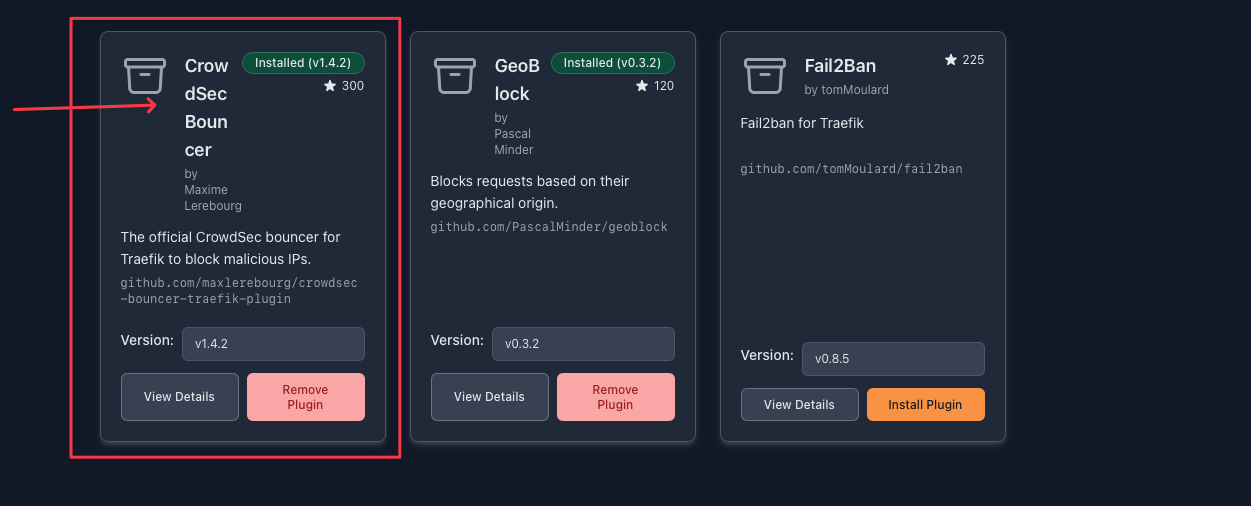
Brief setup & steps taken:
-
Installed Pangolin (with CrowdSec via docker compose).
-
Installed
crowdsec_managerscript -
Set up CAPTCHA with the
crowdsec_managerscript (works directly). -
Installed Middleware Manager via docker compose
-
Unable to make CrowdSec Bouncer middleware work from within Middleware Manager as shown in the step 12
-
Successfully installed and configured Geoblock middleware manually by creating a new plugin from scratch in the middleware manager with this config.
-
{
  "geoblock": {
    "allowLocalRequests": true,
    "allowUnknownCountries": false,
    "api": "https://get.geojs.io/v1/ip/country/{ip}",
    "apiTimeoutMs": 500,
    "blackListMode": false,
    "cacheSize": 25,
    "countries": [
      "US"
    ],
    "forceMonthlyUpdate": true,
    "logAllowedRequests": false,
    "logApiRequests": false,
    "logLocalRequests": false,
    "silentStartUp": false,
    "unknownCountryApiResponse": "nil"
  }
}
What I want:
Currently, when applied externally (outside of Middleware Manager), the CrowdSec Bouncer/CAPTCHA protection applies globally to all endpoints—which is not what I need.
My goal is to apply the CrowdSec Bouncer plugin as a middleware on specific routes/resources, protecting just those selected endpoints with a CAPTCHA challenge.
Therefore:
I need to be able to deploy and manage the CrowdSec Bouncer via Middleware Manager, so I can attach it only where needed, rather than having it protect every single route indiscriminately.
Config & logs:
Attaching my Traefik static/dynamic configs and relevant other files as reference.
This is the block which I’m struggling with, from the static Traefik.
entryPoints:
  web:
    address: :80
  websecure:
    address: :443
    http:
      middlewares:
        - crowdsec@file
      tls:
        certResolver: letsencrypt
    transport:
      respondingTimeouts:
        readTimeout: 30m
experimental:
  plugins:
    badger:
      moduleName: github.com/fosrl/badger
      version: v1.2.0
    crowdsec:
      moduleName: github.com/maxlerebourg/crowdsec-bouncer-traefik-plugin
      version: v1.4.4 # this exists alreay from PANGOLIN installation
    crowdsec-bouncer-traefik:
      moduleName: github.com/maxlerebourg/crowdsec-bouncer-traefik-plugin
      version: v1.4.2  #this is added by the middleware manager
This is the Traefik dynamic config (Which, by the way, CAPTCHA setup works perfectly, but outside of the MiddlewareManager.)
http:
  middlewares:
    crowdsec:
      plugin:
        crowdsec:
          clientTrustedIPs:
            - 0.0.0.0/8
            - 0.0.0.0/12
            - 0.0.0.0/16
            - 0.0.0.0/20
          crowdsecAppsecBodyLimit: 10485760
          crowdsecAppsecEnabled: true
          crowdsecAppsecFailureBlock: true
          crowdsecAppsecHost: crowdsec:7422
          crowdsecAppsecUnreachableBlock: true
          crowdsecLapiHost: crowdsec:8080
          crowdsecLapiKey: secret
          crowdsecLapiScheme: http
          crowdsecMode: live
          defaultDecisionSeconds: 15
          enabled: true
          captchaProvider: turnstile
          captchaSiteKey: "secret"
          captchaSecretKey: "secret"
          captchaGracePeriodSeconds: 1800
          captchaHTMLFilePath: "/etc/traefik/conf/captcha.html"
          forwardedHeadersTrustedIPs:
            - 0.0.0.0/0
          httpTimeoutSeconds: 10
          logLevel: INFO
          updateIntervalSeconds: 15
          updateMaxFailure: 0
    default-whitelist:
      ipWhiteList:
        sourceRange:
          - 0.0.0.0/8
          - 0.0.0.0/16
          - 0.0.0.0/12
    redirect-to-https:
      redirectScheme:
        scheme: https
    security-headers:
      headers:
        contentTypeNosniff: true
        customFrameOptionsValue: SAMEORIGIN
        customResponseHeaders:
          Server: ""
          X-Forwarded-Proto: https
          X-Powered-By: ""
        forceSTSHeader: true
        hostsProxyHeaders:
          - X-Forwarded-Host
        referrerPolicy: strict-origin-when-cross-origin
        sslProxyHeaders:
          X-Forwarded-Proto: https
        stsIncludeSubdomains: true
        stsPreload: true
        stsSeconds: 63072000

  routers:
    api-router:
      entryPoints:
        - websecure
      middlewares:
        - security-headers
      rule: Host(`pangolin.example.com`) && PathPrefix(`/api/v1`)
      service: api-service
      tls:
        certResolver: letsencrypt
    main-app-router-redirect:
      entryPoints:
        - web
      middlewares:
        - redirect-to-https
      rule: Host(`pangolin.example.com`)
      service: next-service
    next-router:
      entryPoints:
        - websecure
      middlewares:
        - security-headers
      rule: Host(`pangolin.example.com`) && !PathPrefix(`/api/v1`)
      service: next-service
      tls:
        certResolver: letsencrypt
        domains:
          - main: "pangolin.example.com"
            sans:
              - "*.pangolin.example.com"

    ws-router:
      entryPoints:
        - websecure
      middlewares:
        - security-headers
      rule: Host(`pangolin.example.com`)
      service: api-service
      tls:
        certResolver: letsencrypt
  services:
    api-service:
      loadBalancer:
        servers:
          - url: http://pangolin:3000
    next-service:
      loadBalancer:
        servers:
          - url: http://pangolin:3002
A diagnostic check from the crowdsec manager
[+] traefik container is running
Verifying Traefik middleware configuration:
[+] CrowdSec referenced in ./config/traefik/traefik_config.yml
[+] CrowdSec referenced in ./config/traefik/*.yml
[+] CrowdSec referenced in ./config/traefik/rules/*.yml

Verifying Traefik middleware configuration:
[+] CrowdSec referenced in ./config/traefik/traefik_config.yml
[+] CrowdSec referenced in ./config/traefik/*.yml
[+] CrowdSec referenced in ./config/traefik/rules/*.yml

Verifying key configuration settings:
[+] CrowdSec LAPI key found in ./config/middleware-manager/templates.yaml
[+] CrowdSec AppSec is enabled in ./config/middleware-manager/templates.yaml
[+] CrowdSec middleware configured in ./config/middleware-manager/templates.yaml
[+] CrowdSec LAPI key found in ./config/traefik/rules/dynamic_config.yml
[+] CrowdSec AppSec is enabled in ./config/traefik/rules/dynamic_config.yml
[+] CrowdSec middleware configured in ./config/traefik/rules/dynamic_config.yml
[+] CrowdSec LAPI key found in ./config/traefik/rules/resource-overrides.yml
[+] CrowdSec middleware configured in ./config/traefik/rules/resource-overrides.yml
[+] CrowdSec middleware configured in ./config/traefik/traefik_config.yml
My docker compose file
name: pangolin
networks:
  default:
    driver: bridge
    enable_ipv6: true
    name: pangolin
services:
  crowdsec:
    command: -t
    container_name: crowdsec
    environment:
      COLLECTIONS: crowdsecurity/traefik crowdsecurity/appsec-virtual-patching crowdsecurity/appsec-generic-rules
      ENROLL_INSTANCE_NAME: pangolin-crowdsec
      ENROLL_TAGS: docker
      ENROLL_KEY: your-enrollment-key-here
      GID: "1000"
      PARSERS: crowdsecurity/whitelists
    healthcheck:
      interval: 10s
      retries: 15
      test: ["CMD", "cscli", "capi", "status"]
      timeout: 10s
    image: docker.io/crowdsecurity/crowdsec:latest
    labels:
      - traefik.enable=false
    ports:
      - 6060:6060
    restart: unless-stopped
    volumes:
      - /path/to/data/config/crowdsec:/etc/crowdsec
      - /path/to/data/config/crowdsec/db:/var/lib/crowdsec/data
      - /path/to/data/config/traefik/logs:/var/log/traefik
  gerbil:
    cap_add:
      - NET_ADMIN
      - SYS_MODULE
    command:
      - --reachableAt=http://gerbil:3003
      - --generateAndSaveKeyTo=/var/config/key
      - --remoteConfig=http://pangolin:3001/api/v1/
    container_name: gerbil
    depends_on:
      pangolin:
        condition: service_healthy
    image: docker.io/fosrl/gerbil:1.2.1
    ports:
      - 51820:51820/udp
      - 21820:21820/udp
      - 443:443
      - 80:80
    restart: unless-stopped
    volumes:
      - /path/to/data/config/:/var/config
  pangolin:
    container_name: pangolin
    healthcheck:
      interval: 10s
      retries: 15
      test: ["CMD", "curl", "-f", "http://localhost:3001/api/v1/"]
      timeout: 10s
    image: docker.io/fosrl/pangolin:1.10.3
    restart: unless-stopped
    volumes:
      - /path/to/data/config:/app/config
      - ./config/config.yml:/app/config/config.yml
      - /path/to/data/pangolin-data:/var/certificates
      - /path/to/data/pangolin-data:/var/dynamic
  traefik:
    command:
      - --configFile=/etc/traefik/traefik_config.yml
    container_name: traefik
    depends_on:
      crowdsec:
        condition: service_healthy
      pangolin:
        condition: service_healthy
    image: docker.io/traefik:v3.5
    network_mode: service:gerbil
    restart: unless-stopped
    volumes:
      - /path/to/data/config/traefik:/etc/traefik
      - /path/to/data/config/traefik/rules:/rules
      - /path/to/data/config/letsencrypt:/letsencrypt
      - /path/to/data/config/traefik/logs:/var/log/traefik
      - /path/to/data/pangolin-data:/var/certificates:ro
      - /path/to/data/pangolin-data:/var/dynamic:ro

  middleware-manager:
    image: hhftechnology/middleware-manager:v3.0.3
    container_name: middleware-manager
    restart: unless-stopped
    depends_on:
        - pangolin
        - traefik
    volumes:
      - /path/to/data/data:/data
      - /path/to/data/config/traefik/rules:/conf
      - /path/to/data/config/middleware-manager:/app/config
      - /path/to/data/config/traefik:/etc/traefik
    environment:
      - PANGOLIN_API_URL=http://pangolin:3001/api/v1
      - TRAEFIK_CONF_DIR=/conf
      - DB_PATH=/data/middleware.db
      - PORT=3456
      - ACTIVE_DATA_SOURCE=pangolin
      - TRAEFIK_STATIC_CONFIG_PATH=/etc/traefik/traefik_config.yml
      - PLUGINS_JSON_URL=https://example.com/plugins.json
    ports:
      - "3456:3456"
    networks:
Then I got stuck here 
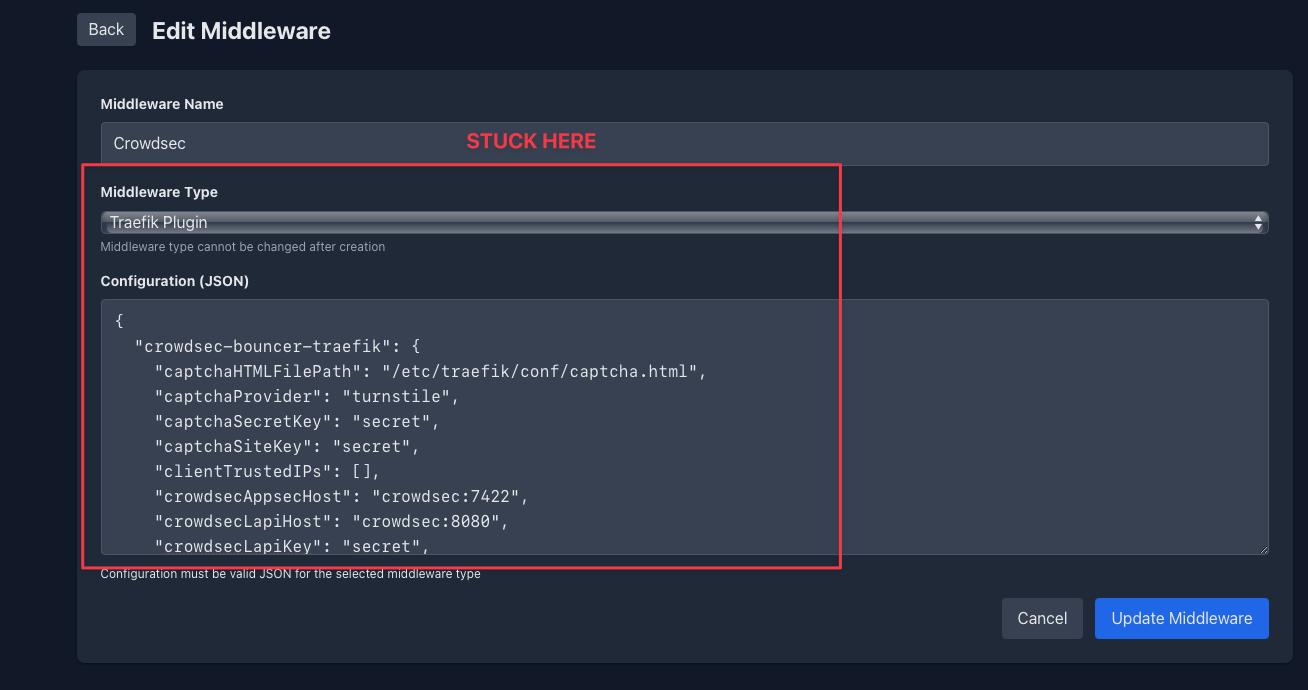
Question:
Has anyone managed to get past this specific step (step 12) when using Pangolin with CrowdSec installed via the Pangolin installer, together with Middleware Manager?
In other words: is there a way to successfully add and use the CrowdSec Bouncer as a middleware in Middleware Manager, specifically when CrowdSec comes from the Pangolin installation process, not when installed separately?
Any insight or confirmed working setup in this scenario would be greatly appreciated!
Thank you!
This line in your traefik_config.yml
entryPoints:
  web:
    address: :80
  websecure:
    address: :443
    http:
      middlewares:
        - crowdsec@file #this line*****
      tls:
        certResolver: letsencrypt
    transport:
      respondingTimeouts:
        readTimeout: 30m
is adding crowdsec to ALL your inbound web traffic. Remove the crowdsec middleware on the entrypoints and add crowdsec to individual routers as middlewares
Yes, that resolved everything! 
thank you for your help and clear explanation! @Mattercoder
What I did:
-
I commented this reference section in my
traefik_config.yml
#middlewares:
# - crowdsec@filefile -
I also deleted the old CrowdSec configuration from my
dynamic_config.yml -
After that, I added the CrowdSec configuration directly through the Middleware Manager UI using the crowdsec middleware template. The manager updated the
resource-overrides.ymlautomatically.
Here is my CrowdSec config added through the Middleware Manager UI (for reference):
{
  "crowdsec": {
    "captchaGracePeriodSeconds": 1800,
    "captchaHTMLFilePath": "/etc/traefik/conf/captcha.html",
    "captchaProvider": "turnstile",
    "captchaSecretKey": "XXXXXXXXXXXXXXXXXXXX",
    "captchaSiteKey": "XXXXXXXXXXXXXX",
    "clientTrustedIPs": [
      "x.x.x.x/8",
      "xxx.xx.0.0/12",
      "xxx.xxx.0.0/16",
      "xx.xx.0.0/10"
    ],
    "crowdsecAppsecBodyLimit": 10485760,
    "crowdsecAppsecEnabled": true,
    "crowdsecAppsecFailureBlock": true,
    "crowdsecAppsecHost": "crowdsec:7422",
    "crowdsecAppsecUnreachableBlock": true,
    "crowdsecLapiHost": "crowdsec:8080",
    "crowdsecLapiKey": "XXXXXXXXXXXXXXXXXXXXXXXXXXXXXXXX",
    "crowdsecLapiScheme": "http",
    "crowdsecMode": "live",
    "defaultDecisionSeconds": 15,
    "enabled": true,
    "forwardedHeadersTrustedIPs": [
      "0.0.0.0/0"
    ],
    "httpTimeoutSeconds": 10,
    "logLevel": "INFO",
    "updateIntervalSeconds": 15,
    "updateMaxFailure": 0
  }
}
Now everything works as intended! I can easily apply CrowdSec/CAPTCHA protection only to selected routers via Middleware Manager.
Side note: I also noticed that the Pangolin dashboard routers (including the API) are not protected by CrowdSec by default. I assume this is intentional for admin access.
Quick question: Do you think it makes sense (from a best-practices/security perspective) to also protect the Pangolin dashboard and its API router with CrowdSec? Are there any potential downsides to securing the dashboard endpoints with CrowdSec in this setup?
Just to note: the Pangolin dashboard is not present as an endpoint in the Middleware Manager, so I assume that in order to protect it, I would need to manually tweak the dynamic configuration file directly.
Here is the relevant snippet for these routers:
routers:
  api-router:
    entryPoints:
      - websecure
    middlewares:
      - security-headers
    rule: Host(`pangolin.example.com`) && PathPrefix(`/api/v1`)
    service: api-service
    tls:
      certResolver: letsencrypt
  main-app-router-redirect:
    entryPoints:
      - web
    middlewares:
      - redirect-to-https
    rule: Host(`pangolin.example.com`)
    service: next-service
  next-router:
    entryPoints:
      - websecure
    middlewares:
      - security-headers
    rule: Host(`pangolin.example.com`) && !PathPrefix(`/api/v1`)
    service: next-service
Thanks again for your insights!
I do have some two questions,
Do I have to add the lines in step 12 to original plug-in, or do I have to delete the original an paste the lines in?
The Crowdsec lapi key, is this the key in local_api_credentials.yaml?
Thanks
Hi. In step 12 you are configuring the middlewares in the middleware manager. You can select the crowdsec middleware and replace the config with the config in step 12 or just change the lapi key.
Regarding the LAPI key that comes from your crowdsec container by running
docker exec crowdsec cscli bouncers add traefik-bouncer
As outlined in step 9
thanks, I did so, the Traefik Dashboard tells me
plugin: unknown plugin type: crowdsec-bouncer-traefik
Make sure the name of the plugin in step 11 when you add the Crowdsec Bouncer Plugin in the Middleware Manager is the same as the plugin name you are using
I did not change the name, after install of the plugin, I found a middleware crowdsec in the middleware section of mm. I did edit this middleware, deleted the original and pasted the text in step 12, and inserted the correct keys, then I did press update middleware.
Check your traefik-config.yml to ensure that the plugin is getting added. If not check that you have specified the correct path to traefik_config.yml. you should see something like
experimental:
    plugins:
        badger:
            moduleName: github.com/fosrl/badger
            version: v1.1.0
        crowdsec-bouncer-traefik:
            moduleName: github.com/maxlerebourg/crowdsec-bouncer-traefik-plugin
            version: v1.4.2

And the rest
Thanks for your patience. My mistake was that I didn’t restart the Traefik container after adding the plugin. Now I only get one error message:
read /etc/traefik/conf/captcha.html: is a directory