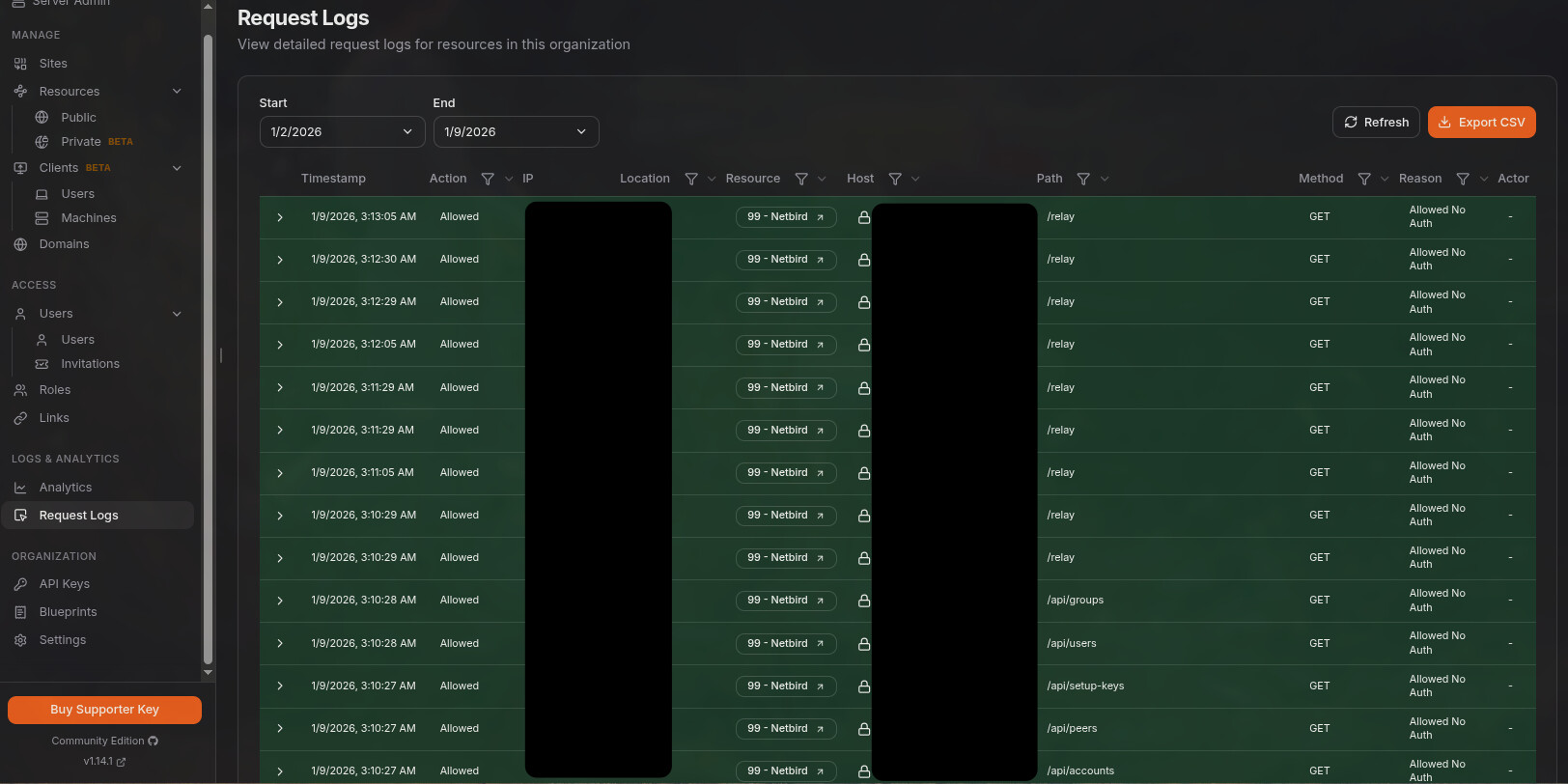
I was stuck trying the get Nebird working with Pangolin and traefik.
Writing this post allowed me to get some of the basic stuff to work:
- Netbird Docker container
- Pocket Id as the IDP for Netbird (Already working with pangolin)
- Netbird dashboard with Packet ID authentication
- Client connection on internal LAN with Packet ID authentication.
https://np.p.example.com now works for the dashboard.
** To Do:**
-
Client relay support through Traefik
-
First Client Peer to Peer config.
-
First Network config.
-
Figure out if the
configure.shscript can be modified to support this config. -
Is it possible to access the netbird container ports without exposing them or redirecting them to other ports.
-
Use the docker hostnames to references the Traefik endpoints internally.
Example use of Pocket-ID as IDP
I am running Packet-ID and would love to use it as the IDP. (I think I have it working now)
I am also using Pangolin as my reverse proxy with authentication is already working with pangolin and Pocket-ID.Steps I took
A couple of attempts of the Self-hosted roll out has been unsuccessful over the last couple of days, with no proper running solution yet.
I am trying it again as I write this, to get the steps I used and get exact errors.-
Used Advanced guide - NetBird Docs
1.1 Using Docker on Ubuntu 22.04.
1.2 Pangolin with Traefik for the reverse proxy. I would like run as much as possible through port 443. ( Not all the services are working yet, E.g. Relay not working)
1.3 I didn’t use the script method, since I don’t have Zitadel. -
Setup
setup.envwith all my settings.
2.1 Followed the Advanced guide - NetBird Docs for the reverse proxy settings.
2.2 I edited the management.json file based on a couple of reddit posts to try and get this working. Will post my details below. -
Added a OICD client under Pocket-ID.
-
In Pocket-ID Client. Most of the settings are default.
- Enabled
PKCE - Set the callback as
https://nb.p.example.com/*andhttp://localhost:53000(I didn’t understand why there was a requirement for this localhost entry until I setup my first client that needed to authenticate using Pocket ID. The Call back is sent back to the client that is running on local host. PocketID uses thelocalhoston the client system since this is where the netbird client is listening on port 53000 for the callbacks. ) - After the config was run, I changed the management.json file one setting at a time and retested until I got it working.
- Enabled
-
OIDC settings in the
setup,envfileNETBIRD_AUTH_AUDIENCE="Client ID"NETBIRD_AUTH_CLIENT_ID="Client ID"NETBIRD_AUTH_CLIENT_SECRET="Secret"NETBIRD_AUTH_OIDC_CONFIGURATION_ENDPOINT="https://pocket.p.example.com/.well-known/openid-configuration"(tested that the URL returns proper JSON results)NETBIRD_AUTH_DEVICE_AUTH_CLIENT_ID="2xxxxxxx-0xxx-4xxx-8xxx-cxxxxxxxxxxx"NETBIRD_AUTH_SUPPORTED_SCOPES="openid profile email"NETBIRD_AUTH_REDIRECT_URI=""NETBIRD_AUTH_SILENT_REDIRECT_URI=""
- I did not disable the Single account mode.
I ran the
configure.shand got the following resultLetsencrypt was disabled, the Https-endpoints cannot be used anymore and a reverse-proxy with Https needs to be placed in front of netbird! The following forwards have to be setup: - https://nb.p.example.com:443 -http-> dashboard:80 - https://nb.p.example.com:443/api -http-> management:443 - https://nb.p.example.com:443/management.ManagementService/ -grpc-> management:443 - https://nb.p.example.com:443/signalexchange.SignalExchange/ -grpc-> signal:80 - rels://nb.p.example.com:33080/relay/ -http-> relay:33080 You most likely also have to change NETBIRD_MGMT_API_ENDPOINT in base.setup.env and port-mappings in docker-compose.yml.tmpl and rerun this script. The target of the forwards depends on your setup. Beware of the gRPC protocol instead of http for management and signal! You are also free to remove any occurrences of the Letsencrypt-volume netbird-letsencryptThe Resulting
docker-compose.yamlfile still has ports exposed that are in use by the reverse proxy. The Traefik example config file in theinfrastructure_filesfolder has all the ports removed. That example uses the Traefik lables that I don’t use. I used the Configuration files for the middleware and routers.These ports were exposed after the config generation.
- dashboard has ports 80 and 443 exposed.
- signal has port 443 exposed.
- management also has pot 443 exposed.
Since these ports are in use when I try and start the container, I changed them all to available ports. Then I changed the router config to use the exposed ports.
Expected behavior
The authentication should work and return to the dashboard. (This now works)
-
FIXED: Authentication of a client installation works, but I get an error on the return to the Dashboard.
Invalid callback URL, it might be necessary for an admin to fix this.
This is displayed on the Pocket authentication page.
In your Pcket-ID Client config, make sure that the callback is http://localhost:53000. NOT HTTPS.
Are you using NetBird Cloud?
Self-host NetBird’s control plane.
Hosted in a local Docker instance separate from Traefik/Pangolin.
NetBird version
0.51.1
Is any other VPN software installed?
No
Debug output
To help us resolve the problem, please attach the following anonymized status output
netbird status -dA
!! I am still trying to figure out how to do this with the docker compose installation since there is no shell to connect to and I don’t know in which folder the netbird is running from.
Create and upload a debug bundle, and share the returned file key:
netbird debug for 1m -AS -U
!! I am still trying to figure out how to do this with the docker compose installation since there is no shell to connect to and I don’t know in which folder the netbird is running from.
Additional context
I have attempted to follow the instructions:
-
Pocket ID as IDP help · Issue #3295 · netbirdio/netbird https://github.com/netbirdio/netbird/issues/3295
-
Request failed with status code 401 (Authentik) · Issue #2941 · netbirdio/netbird · GitHub
-
Stuck on loading screen on “/peers” (Authentik) · Issue #3007 · netbirdio/netbird Stuck on loading screen on "/peers" (Authentik) · Issue #3007 · netbirdio/netbird · GitHub
-
A few posts directed to this page, the comment to the post seems to tbe the only part left: [deleted by user] : r/selfhosted Reddit - The heart of the internet
-
NetBird | Integration | Authelia https://www.authelia.com/integration/openid-connect/clients/netbird/
-
New Relay public thread - Q&A and Issues discussions · Issue #2566 · netbirdio/netbird New Relay public thread - Q&A and Issues discussions · Issue #2566 · netbirdio/netbird · GitHub
Have you tried these troubleshooting steps?
- Reviewed client troubleshooting (if applicable)
- Checked for newer NetBird versions
- Searched for similar issues on GitHub (including closed ones)
- Restarted the NetBird client
- Disabled other VPN software
- Checked firewall settings
- Internal access without any clients, just trying to get access to the dashboard for now.
management.json
RELAY-Secret-Password=32char random value
OICD-Client-ID=PocketID OICD Client ID
OICD-Secret-ID=PocketID OICD Client Password
TURN-Secret-Password=A selfdefines password that also needs to be set int he turnserver.conf. The config will be line this: user=self:TURN-Secret-Password
FIXED1 Relay now working
The below address didn’t match the config in Traefik. It should be:
rels://nb.p.example.com:443/relay. Internally 33080 was used, but since Traefik is now handling the traffic, the external details should be exposed.
    "Relay": {
        "Addresses": [
            "rels://nb.p.example.com:33080"
{
    "Stuns": [
        {
            "Proto": "udp",
            "URI": "stun:nb.p.example.com:3478",
            "Username": "",
            "Password": ""
        }
    ],
    "TURNConfig": {
        "TimeBasedCredentials": false,
        "CredentialsTTL": "12h0m0s",
        "Secret": "secret",
        "Turns": [
            {
                "Proto": "udp",
                "URI": "turn:nb.p.example.com:3478",
                "Username": "self",
                "Password": "TURN-Secret-Password"
            }
        ]
    },
    "Relay": {
        "Addresses": [
            "rels://nb.p.example.com:443/relay"
        ],
        "CredentialsTTL": "24h0m0s",
        "Secret": "RELAY-Secret-Password"
    },
    "Signal": {
        "Proto": "https",
        "URI": "nb.p.example.com:443",
        "Username": "",
        "Password": null
    },
    "Datadir": "/var/lib/netbird/",
    "DataStoreEncryptionKey": "Oxx-ENC-KEY-xk=",
    "HttpConfig": {
        "LetsEncryptDomain": "",
        "CertFile": "",
        "CertKey": "",
        "AuthAudience": "OICD-Client-ID",
        "AuthIssuer": "https://pocket.p.example.com",
        "AuthUserIDClaim": "",
        "AuthKeysLocation": "https://pocket.p.example.com/.well-known/jwks.json",
        "OIDCConfigEndpoint": "https://pocket.p.example.com/.well-known/openid-configuration",
        "IdpSignKeyRefreshEnabled": false,
        "ExtraAuthAudience": ""
    },
    "IdpManagerConfig": {
        "ManagerType": "none",
        "ClientConfig": {
            "Issuer": "https://pocket.p.example.com",
            "TokenEndpoint": "https://pocket.p.example.com/api/oidc/token",
            "ClientID": "OICD-Client-ID",
            "ClientSecret": "",
            "GrantType": "client_credentials"
        },
        "ExtraConfig": {},
        "Auth0ClientCredentials": null,
        "AzureClientCredentials": null,
        "KeycloakClientCredentials": null,
        "ZitadelClientCredentials": null
    },
    "DeviceAuthorizationFlow": {
        "Provider": "hosted",
        "ProviderConfig": {
            "ClientID": "OICD-Client-ID",
            "ClientSecret": "",
            "Domain": "pocket.p.example.com",
            "Audience": "",
            "TokenEndpoint": "https://pocket.p.example.com/api/oidc/token",
            "DeviceAuthEndpoint": "https://pocket.p.example.com/api/oidc/device/authorize",
            "AuthorizationEndpoint": "",
            "Scope": "openid",
            "UseIDToken": false,
            "RedirectURLs": null,
            "DisablePromptLogin": false,
            "LoginFlag": 0
        }
    },
    "PKCEAuthorizationFlow": {
        "ProviderConfig": {
            "ClientID": "OICD-Client-ID",
            "ClientSecret": "OICD-Secret-ID",
            "Domain": "",
            "Audience": "",
            "TokenEndpoint": "https://pocket.p.example.com/api/oidc/token",
            "DeviceAuthEndpoint": "",
            "AuthorizationEndpoint": "https://pocket.p.example.com/authorize",
            "Scope": "openid profile email",
            "UseIDToken": true,
            "RedirectURLs": [
                "http://localhost:53000"
            ],
            "DisablePromptLogin": false,
            "LoginFlag": 0
        }
    },
    "StoreConfig": {
        "Engine": "sqlite"
    },
    "ReverseProxy": {
        "TrustedHTTPProxies": [],
        "TrustedHTTPProxiesCount": 0,
        "TrustedPeers": [
            "0.0.0.0/0"
        ]
    },
    "DisableDefaultPolicy": false
}
compose.yaml
- I changed all the ports that are 443 and 80 to available ports. Traefik is already running on those ports and I needed to redirect from Traefik to these ports. There probably is a way for Traefik to access the containers without them being exposed. Will look into that.
- I changed all the volumes to folders that are store in the docker compose folder to allow easier backup and checking files.
- Lets Encrypt has been disabled since I am using Pangolin that handles the cert management. I talk to all the services internally on HTTP
- FIXED1:
NB_EXPOSED_ADDRESS=rels://nb.p.example.com:33080/relayshould match the Traefik andmanagement.jsonconfig:
NB_EXPOSED_ADDRESS=rels://nb.p.example.com:443/relay
services:
  # UI dashboard
  dashboard:
    image: netbirdio/dashboard:latest
    restart: unless-stopped
    ports:
      - 8093:80
      - 8094:443
    environment:
      # Endpoints
      - NETBIRD_MGMT_API_ENDPOINT=https://nb.p.example.com:443
      - NETBIRD_MGMT_GRPC_API_ENDPOINT=https://nb.p.example.com:443
      # OIDC
      - AUTH_AUDIENCE=OICD-Client-ID
      - AUTH_CLIENT_ID=OICD-Client-ID
      - AUTH_CLIENT_SECRET=OICD-Secret-ID
      - AUTH_AUTHORITY=https://pocket.p.example.com
      - USE_AUTH0=false
      - AUTH_SUPPORTED_SCOPES=openid profile email
      - AUTH_REDIRECT_URI=
      - AUTH_SILENT_REDIRECT_URI=
      - NETBIRD_TOKEN_SOURCE=accessToken
      # SSL
      #      - NGINX_SSL_PORT=443
      # Letsencrypt
      - LETSENCRYPT_DOMAIN=
      - LETSENCRYPT_EMAIL=
    volumes:
      #      - ./netbird-letsencrypt:/etc/letsencrypt/
      - ./config/letsencrypt:/etc/letsencrypt/
    logging:
      driver: json-file
      options:
        max-size: 500m
        max-file: "2"
  # Signal
  signal:
    image: netbirdio/signal:latest
    restart: unless-stopped
    volumes:
      #- netbird-signal:/var/lib/netbird
      - ./config/signal:/var/lib/netbird
    ports:
      #      - 443:80
      - 8095:80
    #      # port and command for Let's Encrypt validation
    #      - 443:443
    #    command: ["--letsencrypt-domain", "", "--log-file", "console"]
    logging:
      driver: json-file
      options:
        max-size: 500m
        max-file: "2"
  # Relay
  relay:
    image: netbirdio/relay:latest
    restart: unless-stopped
    environment:
      - NB_LOG_LEVEL=debug
      - NB_LISTEN_ADDRESS=:33080
      - NB_EXPOSED_ADDRESS=rels://nb.p.example.com:443/relay
      - NB_AUTH_SECRET=RELAY-Secret-Password
    ports:
      - 33080:33080
    logging:
      driver: json-file
      options:
        max-size: 500m
        max-file: "2"
  # Management
  management:
    image: netbirdio/management:latest
    restart: unless-stopped
    depends_on:
      - dashboard
    volumes:
      # - netbird-mgmt:/var/lib/netbird
      # - netbird-letsencrypt:/etc/letsencrypt:ro
      # - ./management.json:/etc/netbird/management.json

      - ./config/mgmt:/var/lib/netbird
      - ./config/letsencrypt:/etc/letsencrypt:ro
      - ./config/management.json:/etc/netbird/management.json
    ports:
      - 8096:80 #API port
    #    # command for Let's Encrypt validation without dashboard container
    #    command: ["--letsencrypt-domain", "", "--log-file", "console"]
    command:
      - --port
      - "80"
      - --log-file
      - console
      - --log-level
      - info
      - --disable-anonymous-metrics=true
      - --single-account-mode-domain=nb.p.example.com
      - --dns-domain=netbird.selfhosted
    logging:
      driver: json-file
      options:
        max-size: 500m
        max-file: "2"
    environment:
      - NETBIRD_STORE_ENGINE_POSTGRES_DSN=
      - NETBIRD_STORE_ENGINE_MYSQL_DSN=
  # Coturn
  coturn:
    image: coturn/coturn:latest
    restart: unless-stopped
    #domainname: nb.p.example.com # only needed when TLS is enabled
    volumes:
      - ./config/turnserver.conf:/etc/turnserver.conf:ro
    #      - ./privkey.pem:/etc/coturn/private/privkey.pem:ro
    #      - ./cert.pem:/etc/coturn/certs/cert.pem:ro
    network_mode: host
    command:
      - -c /etc/turnserver.conf
    logging:
      driver: json-file
      options:
        max-size: 500m
        max-file: "2"

# volumes:
#   netbird-mgmt:
#   netbird-signal:
#   netbird-letsencrypt:
Traefik config
- I added the following router code to handle the direct incoming connections that are not supported by the Pangolin front end.
- I need to get the internal DNS lookups for the hosts to work so that I don’t have to use the internal IPs of the host.
http:
  routers:
###################################################
# Netbird #########################################
###################################################

    netbird-dashboard:
      rule: "Host(`nb.p.example.com`)"
      service: netbird-dashboard
      entryPoints:
        - websecure
      tls:
        certResolver: letsencrypt

    # Netbird Relay router
    netbird-relay-rtr:
      rule: "Host(`nb.p.example.com`) && PathPrefix(`/relay`)"
      service: netbird-relay-service
      entryPoints:
        - websecure
      tls:
        certResolver: letsencrypt

    netbird-signal:
      rule: "Host(`nb.p.example.com`) && PathPrefix(`/signalexchange.SignalExchange/`)"
      service: netbird-signal-service
      entryPoints:
        - websecure
      tls:
        certResolver: letsencrypt

    netbird-api:
      rule: "Host(`nb.p.example.com`) && (PathPrefix(`/api`) || PathPrefix(`/oidc/callback`))"
      service: netbird-api-service
      entryPoints:
        - websecure
      tls:
        certResolver: letsencrypt

    netbird-management:
      rule: "Host(`nb.p.example.com`) && PathPrefix(`/management.ManagementService/`)"
      service: netbird-management-service
      entryPoints:
        - websecure
      tls:
        certResolver: letsencrypt

  services:

 # Netbird services
    netbird-dashboard:
      loadBalancer:
        passHostHeader: true
        servers:
#          - url: "http://netbird-dashboard:80"  # Default Netbird service
          - url: "http://192.168.1.9:8093"  # Default Netbird service

    netbird-relay-service:
      loadBalancer:
        servers:
          #- url: "http://netbird-relay:33080"  # Netbird Relay service
          - url: "https://192.168.1.9:33080"  # Netbird Relay service

    netbird-signal-service:
      loadBalancer:
        servers:
          #- url: "h2c://netbird-signal:10000"
          - url: "h2c://192.168.1.9:8095"

    netbird-api-service:
      loadBalancer:
        servers:
          #- url: "http://netbird-management:80"
          - url: "http://192.168.1.9:8096"

    netbird-management-service:
      loadBalancer:
        servers:
          #- url: "h2c://netbird-management:80"
          - url: "h2c://192.168.1.9:8096"
Edit:
FIXED1 : RELAYs fixed. Marked the two locations fixed with FIXED1.