Part 2: Configuring CrowdSec and Bouncer Integration with Pangolin
1. CrowdSec Configuration Files
1.1 Configure acquis.yaml
Create or update /config/crowdsec/acquis.yaml:
filenames:
 - /var/log/auth.log
 - /var/log/syslog
labels:
  type: syslog
---
poll_without_inotify: false
filenames:
  - /var/log/traefik/*.log
labels:
  type: traefik
---
listen_addr: 0.0.0.0:7422
appsec_config: crowdsecurity/appsec-default
name: myAppSecComponent
source: appsec
labels:
  type: appsec
1.2 Configure Local API Credentials
Create /config/crowdsec/local_api_credentials.yaml:
url: http://0.0.0.0:8080
login: localhost
password: <generated_password>  # Will be generated when bouncer is added
1.3 Configure CrowdSec Profiles
Create /config/crowdsec/profiles.yaml:
name: captcha_remediation
filters:
  - Alert.Remediation == true && Alert.GetScope() == "Ip" && Alert.GetScenario() contains "http"
decisions:
 - type: captcha
   duration: 4h
on_success: break

---
name: default_ip_remediation
filters:
 - Alert.Remediation == true && Alert.GetScope() == "Ip"
decisions:
 - type: ban
   duration: 4h
on_success: break

---
name: default_range_remediation
filters:
 - Alert.Remediation == true && Alert.GetScope() == "Range"
decisions:
 - type: ban
   duration: 4h
on_success: break
2. Traefik Integration
2.1 Configure Dynamic Config
Create or update /config/traefik/dynamic_config.yml:
http:
  middlewares:
    crowdsec:
      plugin:
        crowdsec:
          enabled: true
          logLevel: INFO
          updateIntervalSeconds: 15
          defaultDecisionSeconds: 15
          crowdsecMode: live
          crowdsecAppsecEnabled: true
          crowdsecAppsecHost: crowdsec:7422
          crowdsecAppsecFailureBlock: true
          crowdsecAppsecUnreachableBlock: true
          crowdsecLapiKey: "<bouncer_key>"
          crowdsecLapiHost: crowdsec:8080
          crowdsecLapiScheme: http
          captchaProvider: turnstile
          captchaSiteKey: "<your_turnstile_site_key>"
          captchaSecretKey: "<your_turnstile_secret_key>"
          captchaGracePeriodSeconds: 1800
          forwardedHeadersTrustedIPs:
            - "0.0.0.0/0"
          clientTrustedIPs:
            - "10.0.0.0/8"
            - "172.16.0.0/12"
            - "192.168.0.0/16"
            - "100.89.137.0/20"
2.2 Update Traefik Configuration
Modify /config/traefik/traefik_config.yml:
experimental:
  plugins:
    crowdsec:
      moduleName: "github.com/maxlerebourg/crowdsec-bouncer-traefik-plugin"
      version: "v1.3.5"

log:
  level: "INFO"
  format: "json"

accessLog:
  filePath: "/var/log/traefik/access.log"
  format: json
3. Setup CrowdSec Bouncer
3.1 Add Traefik Bouncer
# Add bouncer and save the API key
docker exec crowdsec cscli bouncers add traefik-bouncer
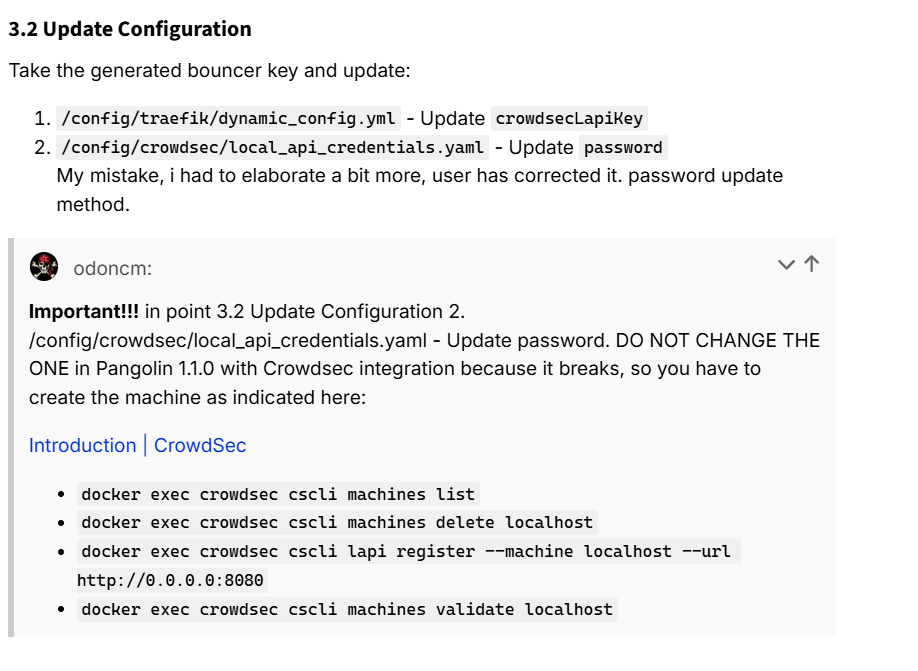
3.2 Update Configuration
Take the generated bouncer key and update:
/config/traefik/dynamic_config.yml- UpdatecrowdsecLapiKey/config/crowdsec/local_api_credentials.yaml- Updatepassword
My mistake, i had to elaborate a bit more, user has corrected it. password update method.
4. Configure Turnstile Captcha
4.1 Get Turnstile Credentials
- Go to Cloudflare Dashboard
- Add a new Turnstile site
- Get site key and secret key
4.2 Update Configuration
Update in /config/traefik/dynamic_config.yml:
captchaSiteKey: "<your_turnstile_site_key>"
captchaSecretKey: "<your_turnstile_secret_key>"
5. Verification and Testing
5.1 Verify Bouncer Configuration
# List bouncers
docker exec crowdsec cscli bouncers list

# Check bouncer metrics
curl http://localhost:6060/metrics | grep bouncer
5.2 Test Decisions
# Add test ban
docker exec crowdsec cscli decisions add -i 1.2.3.4 -t ban -d 1h

# Add test captcha
docker exec crowdsec cscli decisions add --ip 1.2.3.4 --type captcha -d 1h

# List decisions
docker exec crowdsec cscli decisions list
5.3 Monitor Logs
# Monitor CrowdSec logs
docker exec -it crowdsec tail -f /var/log/crowdsec.log

# Monitor Traefik logs
docker compose logs traefik -f
6. Troubleshooting
6.1 Common Issues
- Bouncer Connection Issues:
# Check bouncer status
docker exec crowdsec cscli bouncers list

# Verify API credentials
docker exec crowdsec cat /etc/crowdsec/local_api_credentials.yaml
- Log Access Problems:
# Check log permissions
docker exec -it crowdsec ls -l /var/log/traefik
- Captcha Issues:
# Verify captcha configuration
grep -r "captcha" /config/traefik/dynamic_config.yml
6.2 Reset Steps
If needed, you can reset the bouncer:
# Remove bouncer
docker exec crowdsec cscli bouncers delete traefik-bouncer

# Add new bouncer
docker exec crowdsec cscli bouncers add traefik-bouncer

# Restart services
docker compose restart traefik crowdsec
Next Steps
After completing bouncer setup:
- Configure advanced security policies (Part 3)
- Implement custom rules and scenarios
- Set up alerts and notifications
- Fine-tune captcha and ban settings