The guide you sent was about how to setup crowdsec without docker, on a VPS, to work with Pangolin. So i don´t have a compose for crowdsec.
You should not use docker crowdsec if you install this on VPS.
Guide for Debian and Ubuntu Systems
This document provides instructions for installing and configuring CrowdSec on Debian and Ubuntu.
1. Install CrowdSec
The installation process begins with adding the official CrowdSec repository and then installing the package using the
aptpackage manager.
- Execute the installer script to add the CrowdSec repository to your system’s sources.
curl -s https://install.crowdsec.net | sudo bash
- Install the CrowdSec agent.
sudo apt update
sudo apt install crowdsec -y
...
I mean, would you still recommend to install crowdsec that way on a VPS, or would you just install it via docker? Because that way, gives me the error I described.
this is a great guide. I am nearly through it but a bit stuck on step 3.3
you mention /etc/crowdsec/acquis.yaml
but I don’t have that file.֫ Do I need to create it?
Or has it been replaced with /etc/crowdsec/config.yaml?
If the latter, can you give a bit more context about where those entries should go? right at the end? or do they need to go into a specific section?
Many thanks!
Mike
Have been following this, very useful so thanks.
Curious about why you suggest running crowdsec natively on a VPS is the way to go, rather than Docker? Just making troubleshooting a bit harder as most of the guides are based on Docker.
There also seems to be a step missing about how to turn on traefik access logs so that crowdsec has something to read. I’m just trying to get that working now.
And for anyone else looking for /etc/crowdsec/acquis.yaml , they seem to have moved to a directory approach, where you can store multiple different sources e.g.
mike@bla-1:/etc/crowdsec/acquis.d$ ls -al
total 24
drwxr-xr-x  2 root root 4096 May 20 17:32 .
drwxr-xr-x 15 root root 4096 May 19 20:29 ..
-rw-r--r--  1 root root  132 May 19 20:29 appsec.yaml
-rw-r--r--  1 root root  112 May 20 17:31 pangolin.yaml
-rw-r--r--  1 root root  387 May 19 20:20 setup.linux.yaml
-rw-r--r--  1 root root  365 May 19 20:20 setup.sshd.yaml
mike@bla-1:/etc/crowdsec/acquis.d$
My current issue is that my pangolin-traefik bouncer doesn’t seem to be pulling anything…
────────────────────────────────────────────────────────────────────────────────────────────────────────────────────────────────────────────────────────────────────────────────────────
 Name                            IP Address  Valid  Last API pull         Type                       Version                                                                  Auth Type
────────────────────────────────────────────────────────────────────────────────────────────────────────────────────────────────────────────────────────────────────────────────────────
 cs-firewall-bouncer-1779218773              ✔️                                                                                                                                api-key
 cs-firewall-bouncer             127.0.0.1   ✔️      2026-05-20T16:41:17Z  crowdsec-firewall-bouncer  v0.0.34-debian-pragmatic-amd64-4144555453620958398aee64253dfd90bbc1f698  api-key
 pangolin-traefik                            ✔️                                                                                                                                api-key
────────────────────────────────────────────────────────────────────────────────────────────────────────────────────────────────────────────────────────────────────────────────────────
Any ideas what to check?
Thanks,
Mike
@cmj01 you will have your files under
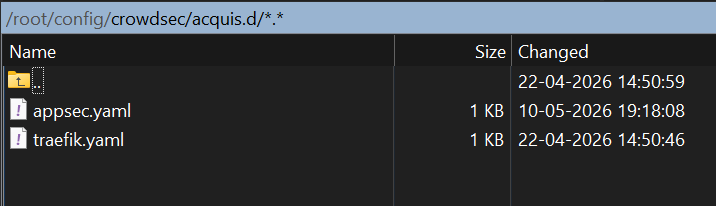
Ah that’s great, thanks!