 How to Avoid Letsencrypt Rate Limits When Testing or Rebuilding Servers
Persisting Let’s Encrypt Certificates in Ephemeral VPS Environments
If you’re using Traefik with Letsencrypt cert resolvers and you are deploying ephemeral VPS instances (ones that are created and destroyed regularly) — you’ve probably run into this annoying problem:
Every time you destroy and recreate a VPS, your
acme.jsonfile (which stores Let’s Encrypt certificates) is wiped.
Traefik then requests new certificates, quickly hitting Let’s Encrypt’s rate limits.
This slows testing, makes automation painful, and clutters your certificate history.
In this guide, we’ll walk through two simple persistence strategies (using S3 or Vault) that automatically restore and sync your acme.json file across new deployments.
 How Letsencrypt works
Letsencrypt creates and renews ssl certificates by contactin traefik over port 80 to check that the IP address associated with the domain is correct.
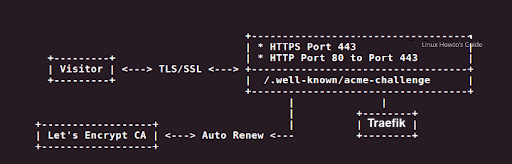
The Problem: Let’s Encrypt Rate Limits
Let’s Encrypt limits certificate requests to prevent abuse. For example:
- 50 certificates per registered domain per week
- 5 duplicate certificates per domain name per week
When you destroy and recreate your Traefik container — as is common in automated tests or temporary deployments — the certificates are lost, forcing Traefik to request new ones every time.
That’s fine once or twice, but in CI/CD pipelines or dynamic environments, you’ll hit the wall fast.
If you could up against this rate limit you will see something like this in your traefik.log
tail -f \var\log\traefik\traefik.log
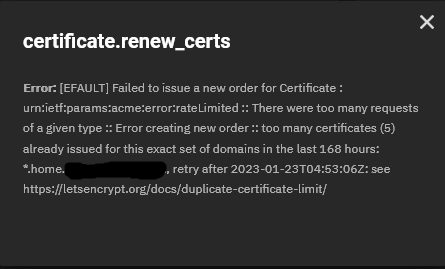
Too many certificates already issued for this exact set of domains in the last 168 hours.
 The Solution: Persist and Restore
 acme.json
Instead of letting Traefik start from scratch each time, you can store and restore your ACME state file from a persistent backend like:
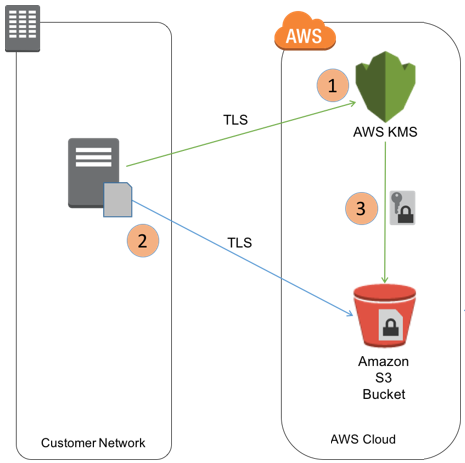
 Amazon S3 — simple, secure, globally available
 HashiCorp Vault — enterprise-grade secrets storage
The approach is the same in both cases:
- At instance boot, check if a previous
acme.jsonexists. - If yes, download it before starting Traefik.
- If not, start fresh.
- After certificate renewal, upload the updated file back to storage.
 S3-Based Bootstrap
Bootstrap script:
#!/bin/bash
set -e
mkdir -p /var/lib/traefik

# Restore from S3 if exists
if aws s3 ls s3://my-bucket/traefik/acme.json >/dev/null 2>&1; then
  echo "Restoring acme.json from S3..."
  aws s3 cp s3://my-bucket/traefik/acme.json /var/lib/traefik/acme.json
else
  echo "No existing acme.json found, starting fresh..."
  touch /var/lib/traefik/acme.json
fi

chmod 600 /var/lib/traefik/acme.json
chown 1000:1000 /var/lib/traefik/acme.json
Traefik service:
services:
  traefik:
    image: traefik:v3.0
    command:
      - "--certificatesresolvers.production.acme.email=you@example.com"
      - "--certificatesresolvers.production.acme.storage=/acme.json"
      - "--certificatesresolvers.production.acme.httpchallenge.entrypoint=web"
    volumes:
      - /var/lib/traefik/acme.json:/acme.json
Sync-back after renewals:
aws s3 cp /var/lib/traefik/acme.json s3://my-bucket/traefik/acme.json
To automate this, add a cron job or systemd timer that syncs the file nightly.
Vault-Based Bootstrap
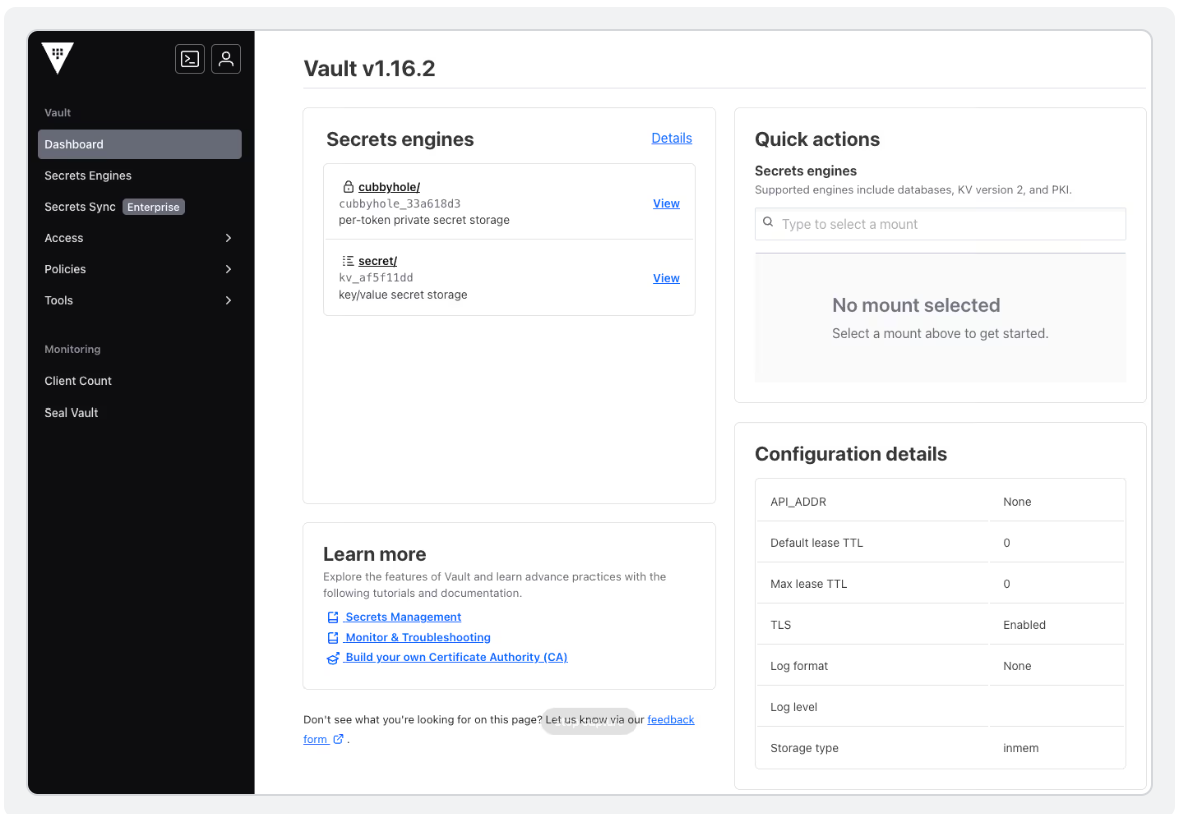
If you already use HashiCorp Vault for your secrets, it can easily manage your acme.json file too.
Vault variant:
#!/bin/bash
set -e
mkdir -p /var/lib/traefik

# Try to restore from Vault KV
if vault kv get -field=acme.json secret/traefik >/var/lib/traefik/acme.json 2>/dev/null; then
  echo "Restored acme.json from Vault"
else
  echo "No existing acme.json in Vault, starting fresh..."
  touch /var/lib/traefik/acme.json
fi

chmod 600 /var/lib/traefik/acme.json
chown 1000:1000 /var/lib/traefik/acme.json
After Traefik renews certs:
vault kv put secret/traefik acme.json=@/var/lib/traefik/acme.json
acme.jsoncontents at rest.
 Screenshot -Vault UI “Secrets” tab
 Terraform Example for AWS
To make it truly automatic, you can include this in your Terraform stack so that every new instance bootstraps itself.
resource "aws_instance" "traefik_vps" {
  ami           = "ami-xxxxxxxx"
  instance_type = "t3.micro"
  subnet_id     = aws_subnet.main.id
  key_name      = "my-key"
  iam_instance_profile = aws_iam_instance_profile.traefik_profile.name

  user_data = <<-EOF
              #!/bin/bash
              set -e
              mkdir -p /var/lib/traefik

              if aws s3 ls s3://my-bucket/traefik/acme.json >/dev/null 2>&1; then
                aws s3 cp s3://my-bucket/traefik/acme.json /var/lib/traefik/acme.json
              else
                touch /var/lib/traefik/acme.json
              fi

              chmod 600 /var/lib/traefik/acme.json
              chown 1000:1000 /var/lib/traefik/acme.json
              EOF
}
 Best Practices
- Use separate staging vs production resolvers (e.g.,
acme-staging.jsonvsacme-production.json) - Automate sync-backs to your chosen backend
- Always restrict permissions (S3 IAM roles or Vault policies)
- Encrypt at rest — KMS for S3, or Vault Transit for KV
- Consider rotating storage locations per environment (dev/test/prod)
Final Thoughts
For anyone automating dynamic deployments — whether it’s with Terraform, or Ansible — this simple persistence pattern can save hours of frustration.
You’ll avoid rate-limit lockouts, preserve your existing certificates, and get true “rebuild resilience” in your infrastructure.
In short: treat your
acme.jsonas a state file, not a cache.
Persist it like you would your Terraform state or database volume.