Handling Multiple DNS Challenges in Traefik with Let’s Encrypt
Traefik is a reverse proxy and load balancer that integrates seamlessly with Let’s Encrypt for automated TLS certificate management using the ACME protocol. One common challenge arises when you need to obtain certificates for multiple domains managed across different DNS providers or accounts (e.g., separate Cloudflare accounts). As of Traefik v3.5 (the latest version as of August 2025), Traefik does not natively support multiple DNS challenge providers in a single instance, but you can work around this limitation using DNS CNAME records to delegate the ACME DNS-01 challenge validation from one domain to another. This allows a single DNS provider/account to handle validations for multiple domains.
This guide explains the concept, why it works, and provides a step-by-step setup based on Traefik’s documentation and real-world examples. We’ll focus on the DNS-01 challenge (preferred for wildcard certificates) and assume you’re using a provider like Cloudflare, but the principles apply to others supporting API tokens for DNS updates. The setup incorporates a secure Docker Compose configuration using Traefik v3, mounted static files, dynamic rules, and Docker secrets for the API token.
Understanding the DNS-01 Challenge and Multi-DNS Limitations
What is the DNS-01 Challenge?
- In the ACME protocol (used by Let’s Encrypt), the DNS-01 challenge requires proving domain ownership by creating a TXT record under
_acme-challenge.yourdomain.com. - Traefik’s built-in ACME client handles this automatically if configured with a DNS provider (e.g., via environment variables or API tokens for Cloudflare).
- For wildcard certificates (e.g.,
*.example.com), DNS-01 is required, as HTTP-01 can’t validate wildcards.
The Multi-DNS Problem
- If your domains are in separate DNS accounts/providers, you can’t configure multiple DNS challenge providers in one Traefik instance.
- Solution: Use CNAME delegation. By creating a CNAME record for
_acme-challenge.subdomain.example.orgpointing to a challenge domain in another account (e.g.,challenge.example.com), you delegate the validation. Let’s Encrypt follows the CNAME and checks the TXT record on the target domain, allowing one account to validate multiple domains.
Why Does This Work? (The “Magic” Explained)
- DNS resolution is hierarchical and follows aliases (CNAMEs).
- When Let’s Encrypt queries
_acme-challenge.example.org, it resolves the CNAME tochallenge.example.comand then looks for the TXT record there. - This doesn’t grant “permission” in a security sense—it’s just DNS redirection. However, since you control both DNS zones (even if in separate accounts), you maintain ownership proof.
- Security note: This is safe as long as you trust the target domain’s DNS provider. It’s “scary” only if misunderstood, but it’s a standard technique documented in ACME specs and tools like cert-manager or Traefik.
- Let’s Encrypt rate limits still apply (e.g., 50 certs/week per domain), but this method consolidates validations.
Prerequisites
- Traefik v3.x installed (e.g., via Docker; we’ll use v3 in examples).
- Domains registered and managed in DNS providers that support API access (e.g., Cloudflare API tokens with DNS edit permissions).
- Separate accounts for domains if needed (e.g., one for
domain01.tldand another fordomain02.tld). - Basic understanding of Traefik configuration (static and dynamic configs).
- Docker Compose or similar for managing services (examples assume this).
- Docker secrets: Create a secret for the primary Cloudflare token (e.g., via
docker secret create cf_dns_api_token token.txtor in Compose withsecretssection). - Directory structure:
./traefik/traefik.yml: Static config../rules/dynamic_config.yml: Dynamic routers/services../traefik/acme.json: For cert storage (created automatically if missing)../logs,./traefik/plugins-storage,./certs: As needed../secrets/cf_dns_api_token.txt: Primary API token file.
- Optional: A setup like “Pangolin” (appears to be a custom Traefik-based stack for multi-domain management; if not using it, adapt configs to standard Traefik).
Step-by-Step Setup
Step 1: Configure Your DNS Provider Accounts
- Create API tokens in each DNS provider account with permissions for DNS zone edits.
- Decide on a “primary” domain/account for handling challenges (e.g.,
domain01.tldin account “foo”). This will be the target for CNAMEs. - In the secondary domain’s DNS (e.g.,
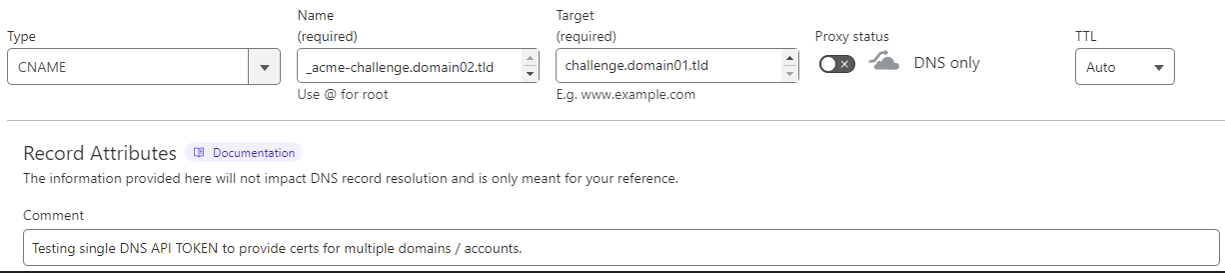
domain02.tldin account “bar”):- Add a CNAME record:
- Name:
_acme-challenge.domain02.tld(or_acme-challengeif using root). - Target:
challenge.domain01.tld(a subdomain in the primary account). - Proxy: DNS-only (not proxied, as it must resolve directly).
- TTL: Auto or low (e.g., 300 seconds).
- Name:
- Example screenshot reference: The provided image shows this setup in Cloudflare, with a comment noting it’s for testing a single API token across multiple domains/accounts.
- Add a CNAME record:
- In the primary domain’s DNS (
domain01.tld):- No special records needed yet—Traefik will create TXT records dynamically under
challenge.domain01.tld.
- No special records needed yet—Traefik will create TXT records dynamically under
Step 2: Configure Traefik Static Configuration
- Create
./traefik/traefik.ymlwith ACME DNS-01 setup. Use the primary Cloudflare token (loaded via environment variable from a secret file). - Enable file provider for dynamic configs in
./rules.
Example traefik.yml:
global:
  checkNewVersion: true
  sendAnonymousUsage: false

entryPoints:
  web:
    address: :80
    http:
      redirections:
        entryPoint:
          to: websecure
          scheme: https
  websecure:
    address: :443

providers:
  docker:
    endpoint: unix:///var/run/docker.sock
    exposedByDefault: false
  file:
    directory: /rules  # Watches for dynamic configs here
    watch: true

certificatesResolvers:
  letsencrypt:
    acme:
      email: your@email.com
      storage: /acme.json
      dnsChallenge:
        provider: cloudflare
        resolvers:
          - "1.1.1.1:53"
          - "8.8.8.8:53"

log:
  level: INFO
  filePath: /logs/traefik.log

# Additional options as needed (e.g., plugins via /plugins-storage)
- Note: The DNS provider (
cloudflare) reads the token fromCF_DNS_API_TOKEN(set via the_FILEenv var in the container). Only the primary token is needed.
Step 3: Set Up Dynamic Configuration for Routers and Certificates
- Create
./rules/dynamic_config.yml(or similar file in./rules). - Define routers with
certResolver: letsencrypt. - Specify domains in the
tls.domainssection. You can combine multiple mains in one router if they share a service, or use separate routers. - For wildcards, set them in
sans. - Address common questions:
- PathPrefix: Optional; use if routing specific paths (e.g., exclude
/api/v1for backend APIs). It doesn’t affect cert issuance. - Same service: Yes, you can use the same backend service (e.g.,
next-servicefor a Next.js app). The app handles requests based on theHostheader. - New entry points: No, reuse existing ones (e.g.,
websecurefor HTTPS). - Multiple routers vs. one: Multiple allow finer control; one with combined domains works if they share logic.
- PathPrefix: Optional; use if routing specific paths (e.g., exclude
Example dynamic_config.yml (adapted from provided config; assumes a Next.js service):
http:
  routers:
    next-router:
      rule: "Host(`domain01.tld`,`domain02.tld`) && !PathPrefix(`/api/v1`)"  # Combined rule
      service: next-service
      entryPoints:
        - websecure
      tls:
        certResolver: letsencrypt
        domains:
          - main: "domain01.tld"  # No wildcard
          - main: "domain02.tld"
            sans:
              - "*.domain02.tld"  # Wildcard for domain02

  services:
    next-service:
      loadBalancer:
        servers:
          - url: http://next-app:3000  # Your backend (e.g., Next.js container)

# Alternative: Separate routers
# http:
#   routers:
#     router-dom01:
#       rule: "Host(`domain01.tld`) && !PathPrefix(`/api/v1`)"
#       service: next-service
#       entryPoints:
#         - websecure
#       tls:
#         certResolver: letsencrypt
#         domains:
#           - main: "domain01.tld"
#
#     router-dom02:
#       rule: "Host(`domain02.tld`) && !PathPrefix(`/api/v1`)"
#       service: next-service
#       entryPoints:
#         - websecure
#       tls:
#         certResolver: letsencrypt
#         domains:
#           - main: "domain02.tld"
#             sans:
#               - "*.domain02.tld"
#
#   services:
#     next-service:
#       loadBalancer:
#         servers:
#           - url: http://next-app:3000
- If using a custom setup like Pangolin, adapt to its domain mapping (e.g.,
config.yml):
domains:
  domain01:
    base_domain: domain01.tld
    cert_resolver: letsencrypt
    prefer_wildcard_cert: false  # No wildcard needed
  domain02:
    base_domain: domain02.tld
    cert_resolver: letsencrypt
    prefer_wildcard_cert: true   # Enable wildcard
Step 4: Docker Compose Setup
- Use the provided Traefik service example. Add secrets and other services (e.g., your Next.js app).
- Ensure ports are exposed (e.g., 80, 443) and networks if needed.
- Create the secret file: Echo your primary Cloudflare token into
./secrets/cf_dns_api_token.txt.
Full example docker-compose.yml:
version: '3.8'

services:
  traefik:
    image: traefik:v3
    container_name: traefik
    restart: always
    environment:
      - CF_DNS_API_TOKEN_FILE=/run/secrets/cf_dns_api_token
    volumes:
      - /etc/localtime:/etc/localtime:ro
      - ./traefik/traefik.yml:/traefik.yml:ro
      - ./rules:/rules:ro
      - ./traefik/acme.json:/acme.json:rw
      - ./logs:/logs:rw
      - ./traefik/plugins-storage:/plugins-storage:rw
      - ./certs:/certs:ro
      - /var/run/docker.sock:/var/run/docker.sock:ro  # For Docker provider
    labels:
      # blah (add your labels here, e.g., for Traefik to route to itself if needed)
    security_opt:
      - no-new-privileges:true
    read_only: true
    ports:
      - "80:80"
      - "443:443"
    secrets:
      - cf_dns_api_token

  # Example backend service (e.g., Next.js)
  next-app:
    image: your-nextjs-image
    container_name: next-app
    restart: always
    labels:
      - "traefik.enable=true"  # If using Docker provider for auto-discovery

secrets:
  cf_dns_api_token:
    file: ./secrets/cf_dns_api_token.txt  # Path to your token file
Step 5: Deploy and Test
- Run:
docker compose down && docker compose up -d. - Traefik will load static config from
traefik.yml, dynamic from/rules, and use the secret token for DNS challenges. - Monitor logs for ACME challenges: Traefik will create TXT records on the primary domain (following CNAME delegation).
- Test: Access
https://domain02.tld—it should serve with a valid cert. Usecurl https://domain02.tldor browser access. Check logs in./logs/traefik.log. - Verify certs: Check
./traefik/acme.json(ordocker exec traefik cat /acme.json) or useopenssl s_client -connect domain02.tld:443or tools like ssllabs.com for cert details.
Troubleshooting
- Challenge fails: Ensure CNAME resolves correctly (
dig _acme-challenge.domain02.tld). Propagation can take time. - Rate limits: If hit, wait or use staging server (add
caServer: "https://acme-staging-v02.api.letsencrypt.org/directory"inacmesection). - Wildcard issues: DNS-01 required; ensure provider supports it.
- Logs: Enable debug (set
level: DEBUGintraefik.ymllog section). - Multi-account security: Use least-privilege API tokens.
- Token issues: Ensure secret is readable; check logs for auth errors.
- Config reload: Traefik watches files; edit
./rules/dynamic_config.ymland it auto-applies. - v3 specifics: If plugins are used, store them in
./traefik/plugins-storage. - Read-only container: Ensures security; configs are ro where possible.
Advanced Tips
- For more domains, add more CNAMEs pointing to the same primary challenge domain.
- If using wildcards on multiple, combine in one
domainsblock to minimize cert requests. - Alternatives: If Traefik evolves further, check docs for native multi-provider support; or use external tools like certbot for manual certs.
- Resources: Traefik ACME docs (search for “CNAME” in multi-provider sections), Let’s Encrypt community forums.
This setup leverages DNS delegation for efficient multi-domain cert management in a secure, production-ready environment. If you encounter issues, provide logs for further help!