This automation is designed for Home Assistant, to instruct the user after the laundry is finished where the drying of the laundry will be most effective, outdoors because of low humidity, high sunlight, high temperature, or in the apartment because the aforementioned conditions are better.
At first, start by creating a sensor that will check the conditions for us.
To do this, go to the configuration.yaml file which is located in the config folder of the Home Assistant application.
You can use two methods: create a separate sensors.yaml file in which we will have separate sensor configuration from the main assistant settings.
In configuration.yaml file add among similar such lines.
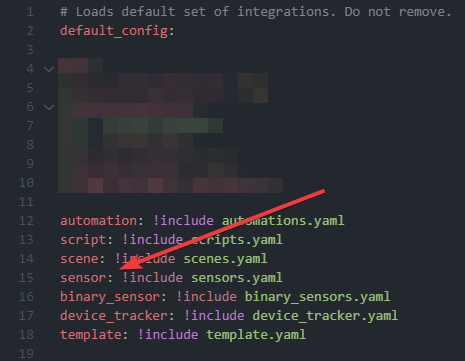
then create the sensors.yaml file in the config directory (the root directory, the same directory where the configuration.yaml file is located)
Add the following code in it:
sensors.yaml file
  - platform: template
    sensors:
      drying_conditions:
        friendly_name: "Conditions for drying clothes"
        value_template: >
          {% set indoor_humidity = states('INSERT INDOOR HUMIDITY SENSOR') | float %}
          {% set outdoor_humidity = states('INSERT OUTDOOR HUMIDITY SENSOR') | float %}
          {% set indoor_temperature = states('INSERT INDOOR TEMP SENSOR') | float %}
          {% set outdoor_temperature = states('INSERT OUTDOOR HUMIDITY SENSOR') | float %}
          {% set precipitation = states('INSERT PRECIPITATION SENSOR') | float %}
          {% set wind_speed = states('INSERT WIND SPEED SENSOR') | float %}
          {% set optimal_conditions = (
              outdoor_humidity < 70 and
              outdoor_temperature > 15 and
              precipitation == 0 and
              wind_speed > 5
          ) %}

          {% if indoor_humidity < 60 and indoor_temperature > 20 and optimal_conditions %}
            Optimal everywhere
          {% elif indoor_humidity < 60 and indoor_temperature > 20 %}
            Good at home
          {% elif optimal_conditions %}
            Good outdoors
          {% else %}
            Suboptimal
          {% endif %}
        icon_template: >
          {% if is_state('sensor.drying_conditions', 'Optimal everywhere') %}
            mdi:tshirt-crew
          {% elif is_state('sensor.drying_conditions', 'Good at home') %}
            mdi:tshirt-crew-outline
          {% elif is_state('sensor.drying_conditions', 'Good outdoors') %}
            mdi:tshirt-v-outline
          {% else %}
            mdi:tshirt-crew-off-outline
          {% endif %}
or just add following code at the end of your configuration.yaml file and substitute the selected fields for your data:
configuration.yaml
sensor:
  - platform: template
    sensors:
      drying_conditions:
        friendly_name: "Conditions for drying clothes"
        value_template: >
          {% set indoor_humidity = states('INSERT INDOOR HUMIDITY SENSOR') | float %}
          {% set outdoor_humidity = states('INSERT OUTDOOR HUMIDITY SENSOR') | float %}
          {% set indoor_temperature = states('INSERT INDOOR TEMP SENSOR') | float %}
          {% set outdoor_temperature = states('INSERT OUTDOOR HUMIDITY SENSOR') | float %}
          {% set precipitation = states('INSERT PRECIPITATION SENSOR') | float %}
          {% set wind_speed = states('INSERT WIND SPEED SENSOR') | float %}
          {% set optimal_conditions = (
              outdoor_humidity < 70 and
              outdoor_temperature > 15 and
              precipitation == 0 and
              wind_speed > 5
          ) %}

          {% if indoor_humidity < 60 and indoor_temperature > 20 and optimal_conditions %}
            Optimal everywhere
          {% elif indoor_humidity < 60 and indoor_temperature > 20 %}
            Good at home
          {% elif optimal_conditions %}
            Good outdoors
          {% else %}
            Suboptimal
          {% endif %}
        icon_template: >
          {% if is_state('sensor.drying_conditions', 'Optimal everywhere') %}
            mdi:tshirt-crew
          {% elif is_state('sensor.drying_conditions', 'Good at home') %}
            mdi:tshirt-crew-outline
          {% elif is_state('sensor.drying_conditions', 'Good outdoors') %}
            mdi:tshirt-v-outline
          {% else %}
            mdi:tshirt-crew-off-outline
          {% endif %}
To add automation, for example, after a laundry is done, go to: Settings → Automations and Scenes → in the lower right corner: Add Automation → Create New Automation → In the upper right corner select the 3 vertical dots sign → Edit in YAML → Paste the following code substituting the selected fields for your data.
automation code
alias: Drying conditions
description: ""
triggers:
  - trigger: state
    entity_id:
      - YOUR WASHINGMACHINE POWER STATE (on or off)
    from: "on"
    to: "off"
conditions: []
actions:
  - action: notify.mobile_app_YOUR_DEVICE
    metadata: {}
    data:
      message: >-
        The current conditions for drying clothes are {{
        states('sensor.drying_conditions') }}.
mode: single
If you have any questions, problems, please respond in the post below. I’ll be happy to help, to give suggestions.