Guide to Securing Your Traefik Setup
This guide hardens your current Traefik configuration.
Your setup uses one dynamic file: /etc/traefik/dynamic_config.yml.
Make changes step by step. Restart Traefik after. Test on SSL Server Test (Powered by Qualys SSL Labs) and https://securityheaders.com/.
Step 1: Add Secure Headers Middleware
Add headers for A+ score on securityheaders.com.
In dynamic file /etc/traefik/dynamic_config.yml, add to http.middlewares:
http:
  middlewares:
    redirect-to-https:
      redirectScheme:
        scheme: https

    secure-headers:
      headers:
        stsSeconds: 63072000  # 2 years
        stsIncludeSubdomains: true
        stsPreload: true
        forceSTSHeader: true
        frameDeny: true
        customFrameOptionsValue: "SAMEORIGIN"
        contentTypeNosniff: true
        browserXssFilter: true
        customBrowserXSSValue: "1; mode=block"
        referrerPolicy: "same-origin"
        permissionsPolicy: "camera=(), microphone=(), geolocation=()"
        customResponseHeaders:
          X-Robots-Tag: "none,noarchive,nosnippet,notranslate,noimageindex"
          X-Powered-By: ""
          Server: ""
This adds HSTS, blocks frames, removes server info.
Step 2: Apply Secure Headers to HTTPS Routers
Apply only on HTTPS.
In dynamic file, add middlewares: - secure-headers to each HTTPS router:
Example for next-router:
    next-router:
      rule: "Host(`{{.DashboardDomain}}`) && !PathPrefix(`/api/v1`)"
      service: next-service
      entryPoints:
        - websecure
      middlewares:
        - secure-headers
      tls:
        certResolver: letsencrypt
Do same for api-router and ws-router.
Your HTTP redirect router keeps redirect-to-https. Good.
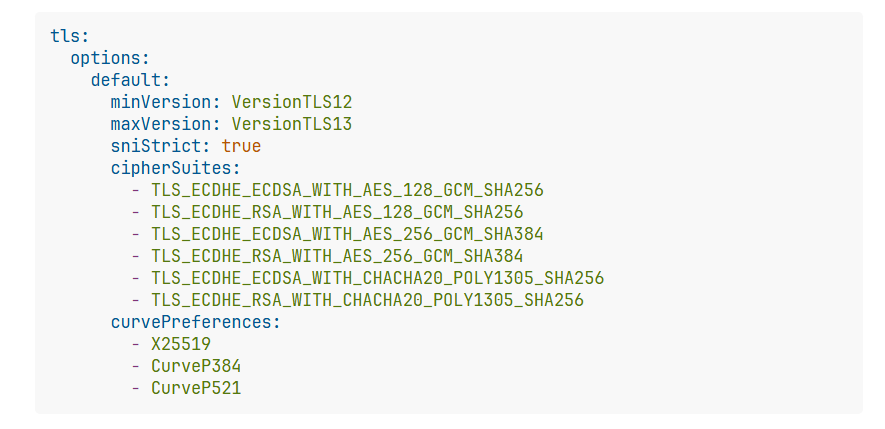
Step 3: Harden TLS Settings
Force strong TLS. Good for A+ on SSL Labs.
In dynamic file, add at top level:
tls:
  options:
    default:
      minVersion: VersionTLS12
      maxVersion: VersionTLS13
      sniStrict: true
      cipherSuites:
        - TLS_ECDHE_ECDSA_WITH_AES_128_GCM_SHA256
        - TLS_ECDHE_RSA_WITH_AES_128_GCM_SHA256
        - TLS_ECDHE_ECDSA_WITH_AES_256_GCM_SHA384
        - TLS_ECDHE_RSA_WITH_AES_256_GCM_SHA384
        - TLS_ECDHE_ECDSA_WITH_CHACHA20_POLY1305_SHA256
        - TLS_ECDHE_RSA_WITH_CHACHA20_POLY1305_SHA256
      curvePreferences:
        - X25519
        - CurveP384
        - CurveP521
In static config, under entryPoints.websecure.http.tls:
    http:
      tls:
        options: default
        certResolver: letsencrypt
This applies to all HTTPS traffic.
Step 4: Fix insecureSkipVerify
Do not skip backend cert verify.
In static config, change or remove:
serversTransport:
  insecureSkipVerify: false  # Or remove line
Force verify backend certs. Use real certs on backends if needed.
Step 5: Remove Unneeded Timeouts (Optional)
You have respondingTimeouts: readTimeout: "30m".
Long timeouts risk DoS. Remove or lower if not needed.
In static config, under entryPoints.websecure.transport:
Remove or set lower like readTimeout: "10s".
Step 6: Switch to DNS Challenge (Recommended)
HTTP challenge needs port 80 open always.
DNS challenge better. Supports wildcards. No port open for renew.
In static config, change certificatesResolvers:
certificatesResolvers:
  letsencrypt:
    acme:
      email: "{{.LetsEncryptEmail}}"
      storage: "/letsencrypt/acme.json"
      dnsChallenge:
        provider: cloudflare  # Or your provider
        delayBeforeCheck: 60
        resolvers:
          - "1.1.1.1:53"
          - "1.0.0.1:53"
Add env vars or secrets for provider token.
Use scoped token.
Final Notes
- Keep your TCP proxy protocol parts if needed.
- Test changes. Check logs.
- This setup gets A+ on tests.
- For extra: Add rate limit middlewares or CrowdSec.
Restart Traefik. Your setup now secure.
Old Guild which is in-depth and comprehensive
Security and Performance Enhancements in Traefik Configuration in pangolin - Networking - HHF Technology Forums