The protection status in MM only has to do with MM. Something not being protected in MM shows as not protected meaning no middleware has been added. The protection status in MM doesn’t reflect Pangolin’s SSO protection.
The thing that I don’t get is why when changing the protection in Pangolin shows as “protected” in MM? I am not doing anything in MM, so it should remain unprotected, right?
Is there a way to implement OIDC for use with Pocket-ID?
Do you mean via Middleware-manager?
Don’t listen to me. I messed up the Traefik implementation and my Pangolin is dead. I haven’t been able to correctly configure the official version of Pangolin + Crowdsec, adding the Middleware Manager. I think the rules directory is causing problems. Any thoughts?
ping on crowdsec channel on cord, HHF Technology i will walk you through
Heya, what do you mean by “the proxy”? I’m running a very similar setup to @arcanazen and getting the same issue.
Hi and welcome. What issue? Explain a little more and we will try to help
There’s a guide on that here
Here’s my setup and results
Containers
- VPS
- Pangolin
- Traefik
- Middleware-manager
- Gerbil
- Local server
- Newt
- Authentik
- Services
Configs
Pangolin
Service and Authentik configs are done thru docker labels
labels:
  - pangolin.proxy-resources.authentik.name=Authentik
  - pangolin.proxy-resources.authentik.full-domain=auth.my_domain.com
  - pangolin.proxy-resources.authentik.protocol=http
  - pangolin.proxy-resources.authentik.auth.enabled=false
  - pangolin.proxy-resources.authentik.targets[0].method=http
  - pangolin.proxy-resources.authentik.targets[0].port=9000
labels:
  - pangolin.proxy-resources.service_a.name=Service_a
  - pangolin.proxy-resources.service_a.full-domain=service_a.my_domain.com
  - pangolin.proxy-resources.service_a.protocol=http
  - pangolin.proxy-resources.service_a.auth.enabled=false
  - pangolin.proxy-resources.service_a.targets[0].method=http
  - pangolin.proxy-resources.service_a.targets[0].port=8080
No other modifications have been made to the resources in the Pangolin webui
Middleware-manager
the JSON config is a bit of a mix of @hhf.technoloy’s comment above and discussion Help with authentik #20 on github (I can’t link it due to permissions)
{
  "address": "http://auth.my_domain.com/outpost.goauthentik.io/auth/traefik",
  "authResponseHeaders": [
    "X-authentik-username",
    "X-authentik-groups",
    "X-authentik-email",
    "X-authentik-name",
    "X-authentik-uid",
    "X-authentik-jwt",
    "X-authentik-meta-jwks",
    "X-authentik-meta-outpost",
    "X-authentik-meta-provider",
    "X-authentik-meta-app",
    "X-authentik-meta-version"
  ],
  "trustForwardHeader": true
}
This middleware is applied to the resource “service_a”
Authentik
Service is configured as follows
Name:       service_a
Slug:       service_a
Provider:   Provider for service_a
Launch URL: https://service_a.my_domain.com

(all other settings left unchanged)
Here is the provider config
Name:                    Provider for service_a
Assigned to application: service_a
Mode:                    Forward auth (domain-level)
External Host:           https://auth.my_domain.com
Internal Host:           https://service_a.my_domain.com
Cookie domain:           my_domain.com

(all other settings left unchanged)
The outpost
Name:      authentik Embedded Outpost
Providers: ['Provider for service_a',]
Health:    Last seen < 10sec ago
Workflow
- Go to https://service_a.my_domain.com
- I am redirected to “Welcome to authentik!” page with login
- Log in to authentik
- I am redirected a few times in rapid succession, ending up back at “Welcome to authentik!”
- Log in to authentik a second time
- I am redirected to https://auth.my_domain.com
- Trying to go to https://service_a.my_domain.com at this point downloads a file called
traefik
Did you include the authentek “outpost” proxy in your docker compose. Authentik won’t work if on a different vps the traefik unless you have included the proxy
Have a look at this
Perfect, thank you!
Had to make some changes, but going to put the whole thing below for interested parties.
Containers
- VPS
- Pangolin
- Traefik
- Middleware-manager
- Gerbil
- Authentik outpost
 new
new
- Local server
- Newt
- Authentik
- Services
Configs
Pangolin
Service and Authentik configs are done thru docker labels
labels:
  - pangolin.proxy-resources.authentik.name=Authentik
  - pangolin.proxy-resources.authentik.full-domain=auth.my_domain.com
  - pangolin.proxy-resources.authentik.protocol=http
  - pangolin.proxy-resources.authentik.auth.enabled=false
  - pangolin.proxy-resources.authentik.targets[0].method=http
  - pangolin.proxy-resources.authentik.targets[0].port=9000
labels:
  - pangolin.proxy-resources.service_a.name=Service_a
  - pangolin.proxy-resources.service_a.full-domain=service_a.my_domain.com
  - pangolin.proxy-resources.service_a.protocol=http
  - pangolin.proxy-resources.service_a.auth.enabled=false
  - pangolin.proxy-resources.service_a.targets[0].method=http
  - pangolin.proxy-resources.service_a.targets[0].port=8080
No other modifications have been made to the resources in the Pangolin webui
Traefik *new*
Ended up having to add forwarded headers on my https traffic
entryPoints:
  web:
    address: ":80"
  websecure:
    address: ":443"
    forwardedHeaders:
      trustedIPs:
        - "127.0.0.1/32"     # Localhost
        - "172.16.0.0/12"    # Docker networks
/outpost.goauthentik.io/ paths also needed to be forwarded to authentik
    authentik-outpost-callback:
      entryPoints:
        - websecure
      rule: "HostRegexp(`{subdomain:[a-z0-9-]+}.my_domain.com`) && PathPrefix(`/outpost.goauthentik.io/`)"
      service: "authentik-outpost-service"
      priority: 500  # Very high priority to catch before other routes
      tls:
        certResolver: "letsencrypt"

    authentik-outpost-service:
      loadBalancer:
        servers:
          - url: "http://authentik_outpost:9000"
Middleware-manager
the JSON config is a bit of a mix of @hhf.technoloy’s comment above and discussion Help with authentik #20 on github (I can’t link it due to permissions)
X-authentik-entitlements new
{
  "address": "http://auth.my_domain.com/outpost.goauthentik.io/auth/traefik",
  "authResponseHeaders": [
    "X-authentik-username",
    "X-authentik-groups",
    "X-authentik-entitlements",
    "X-authentik-email",
    "X-authentik-name",
    "X-authentik-uid",
    "X-authentik-jwt",
    "X-authentik-meta-jwks",
    "X-authentik-meta-outpost",
    "X-authentik-meta-provider",
    "X-authentik-meta-app",
    "X-authentik-meta-version"
  ],
  "trustForwardHeader": true
}
This middleware is applied to the resource “service_a”
Authentik
Service is configured as follows
Name:       service_a
Slug:       service_a
Provider:   Provider for service_a
Launch URL: https://service_a.my_domain.com

(all other settings left unchanged)
Here is the provider config
External host updated
Name:                    Provider for service_a
Assigned to application: service_a
Mode:                    Forward auth (domain-level)
External Host:           https://service_a.my_domain.com
Internal Host:           https://service_a.my_domain.com
Cookie domain:           service_a.my_domain.com

(all other settings left unchanged)
The outpost
Name:      pangolin-outpost
Providers: ['Provider for service_a',]
Health:    Last seen < 10sec ago
Workflow *updated*
- Go to https://service_a.my_domain.com
- I am redirected to “Welcome to authentik!” page with login
- Log in to authentik
- Redirected to site successfully
Notes *new*
It’s weird that I had to set my Authentication URL / External Host for the Domain-level Forward Auth to https://service_a.my_domain.com.
Per Authentik,
The external URL you’ll authenticate at. The authentik core server should be reachable under this URL.
Setting this to https://auth.my_domain.com brought me to an authentik page with a redirect error, though.
Thankyou so much bro
Xin chao! 
Thanks for all the discussion so far!
Today I have just add Middleware Manager to my remote Pangolin server, I see a few issues at the moment. Posting here to discuss further.
First
I get this one in log, not come from middleware-manager, just posted here to see if someone have any ideas of it. I’ve already searched for it and saw a closed issue on Pangolin’s GitHub which is not-solved and still need to investigate further.
{"level":"error","providerName":"http","error":"cannot fetch configuration data: do fetch request: Get \"http://pangolin:3001/api/v1/traefik-config\": dial tcp 172.18.0.6:3001: connect: connection refused","time":"2025-11-06T04:05:08Z","message":"Provider error, retrying in 6.364415927s"}
Second
Now my middleware-manager can easily access from my-pangolin-domain.tld:3456. (Thanks to the bypass UFW of Docker, I do acknowledge that there are solutions, I just not implemented yet)
My question is how to secure the middleware-manager too.
I have tried to add a Local Site on Pangolin host to try to have middleware-manager access as a Pangolin resource (enable SSO) but not successful.
Third
In my middleware-manager dashboard, the data sources are like this. I could not really get the traefik to ever Success. Tried with http://traefik:8080 as suggested, get the same result.
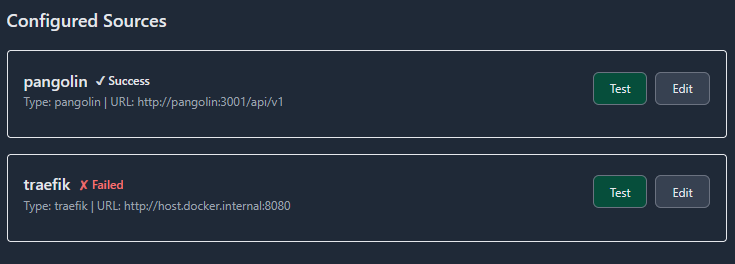
Please advise further and,
Thank you for reading!
I have a question. In my traefik_config I have:
experimental:
    plugins:
        badger:
            moduleName: github.com/fosrl/badger
            version: v1.2.1
        crowdsec:
            moduleName: github.com/maxlerebourg/crowdsec-bouncer-traefik-plugin
            version: v1.4.6
        geoblock:
            moduleName: github.com/PascalMinder/geoblock
            version: v0.3.4
        traefik-oidc-auth:
            moduleName: github.com/sevensolutions/traefik-oidc-auth
            version: v0.17.0
but in my Traefik Plugin Hub page, only geoblock appears as installed.
Should I press install plugin for the crowdsec bouncer (though it’s already installed I assume.
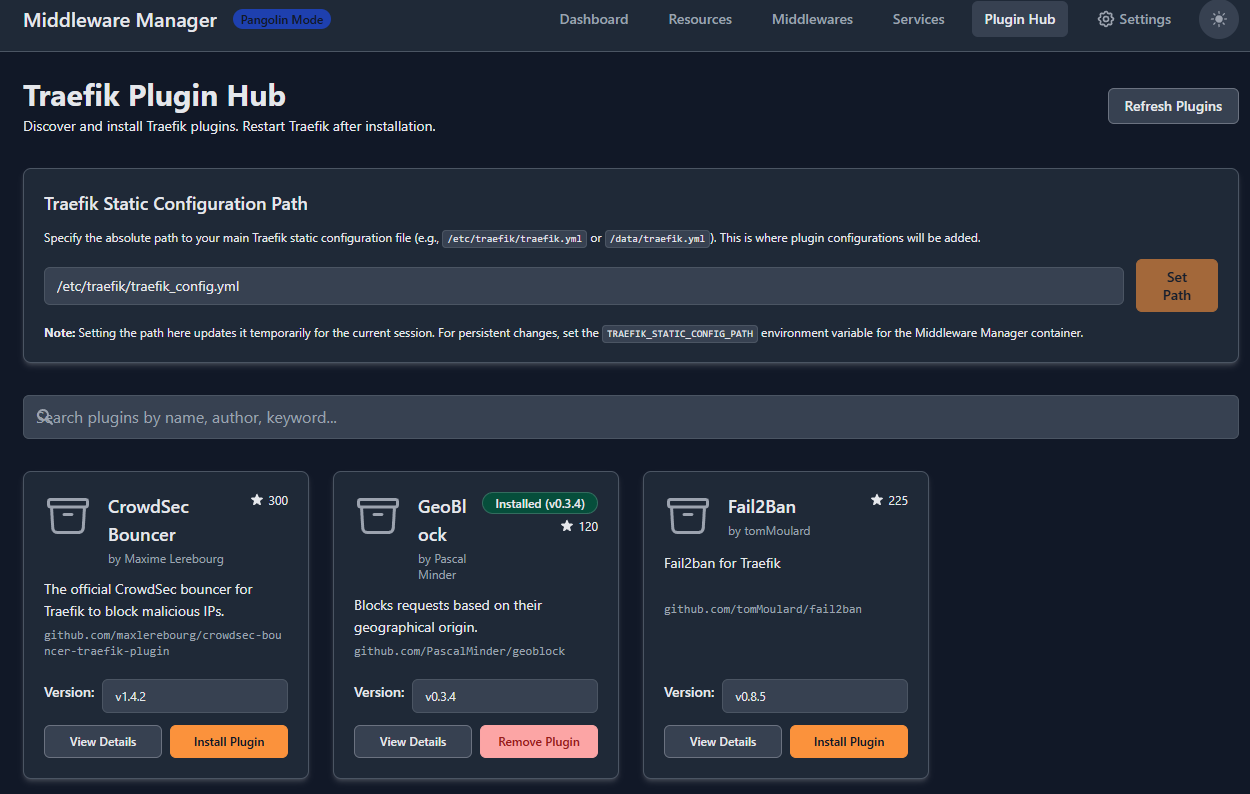
my compose:
  traefik:
    image: traefik:v3
    container_name: traefik
    profiles:
      - pangolin
    networks: ['pangolin', 'net', 'monitor', 'server', 'apps', 'arrs', 'socket-internal', 'vps']
    command:
      - --configFile=/etc/traefik/traefik_config.yml
    depends_on:
      # crowdsec:
      #   condition: service_healthy
      pangolin:
        condition: service_healthy
    environment:
      CLOUDFLARE_DNS_API_TOKEN: ${TRAEFIK_CLOUDFLARE_DNS_API_TOKEN}
    ports:
      - 443:443
      # - 80:80 - DNS challenge (does not need http)
      - 51830:51830/udp   ## wg-easy
      # - 53213:53213       ## qBittorrent
    volumes:
      - ${CONFIGDIR}/.pangolin/traefik:/etc/traefik:ro
      - ${CONFIGDIR}/.pangolin/traefik/conf/captcha.html:/etc/traefik/conf/captcha.html:ro
      - ${CONFIGDIR}/.pangolin/letsencrypt:/letsencrypt
      - ${CONFIGDIR}/.pangolin/traefik/logs:/var/log/traefik
      - ${CONFIGDIR}/.pangolin/traefik/rules:/rules
    security_opt:
      - apparmor:unconfined
    restart: unless-stopped


  crowdsec:
    image: crowdsecurity/crowdsec:latest
    container_name: crowdsec
    profiles:
      - pangolin
    networks:
      - pangolin
    command: -t
    environment:
      #ACQUIRE_FILES: /var/log/traefik/*.log
      COLLECTIONS: crowdsecurity/traefik crowdsecurity/appsec-virtual-patching crowdsecurity/appsec-generic-rules
      ENROLL_INSTANCE_NAME: pangolin-crowdsec-pve
      ENROLL_TAGS: docker
      GID: ${PGID}
      PARSERS: crowdsecurity/whitelists
      POSTOVERFLOWS: "crowdsecurity/rdns"
      CUSTOM_HOSTNAME: pve
    labels:
      - traefik.enable=false
    ports:
      - 6060:6060
    volumes:
      - ${CONFIGDIR}/.pangolin/crowdsec:/etc/crowdsec
      - ${CONFIGDIR}/.pangolin/crowdsec/db:/var/lib/crowdsec/data
      - ${CONFIGDIR}/.pangolin/traefik/logs:/var/log/traefik
    healthcheck:
      interval: 10s
      retries: 15
      timeout: 10s
      test: ["CMD", "cscli", "capi", "status"]
    security_opt:
      - apparmor:unconfined
    restart: unless-stopped


  middleware-manager:
    image: hhftechnology/middleware-manager:latest
    container_name: middleware-manager
    profiles:
      - ondemand
    networks:
      - pangolin
    volumes:
      - ${CONFIGDIR}/.pangolin/data:/data
      - ${CONFIGDIR}/.pangolin/traefik/rules:/conf
      - ${CONFIGDIR}/.pangolin/traefik:/etc/traefik
      - ${CONFIGDIR}/.pangolin/middleware-manager/templates.yaml:/app/config/templates.yaml
    environment:
      - PANGOLIN_API_URL=http://pangolin:3001/api/v1
      - TRAEFIK_CONF_DIR=/conf
      - TRAEFIK_STATIC_CONFIG_PATH=/etc/traefik/traefik_config.yml
      - DB_PATH=/data/middleware.db
      - PORT=3456
    expose:
      - 3456
    security_opt:
      - apparmor:unconfined
    restart: unless-stopped