The pangolin routers don’t show up in the middleware manager if your using the default pangolin API (which I guess most people are). So if you want to apply the middlewares to the pangolin routers then do it manually in dynamic_config. That is totally fine to do.
Thanks for the great work! I think I have a middleware bug but I can’t seem to fix it. When I’m in http challenge with middleware-manager I have no errors and everything works but when I try to switch to DNS challenge I get this error
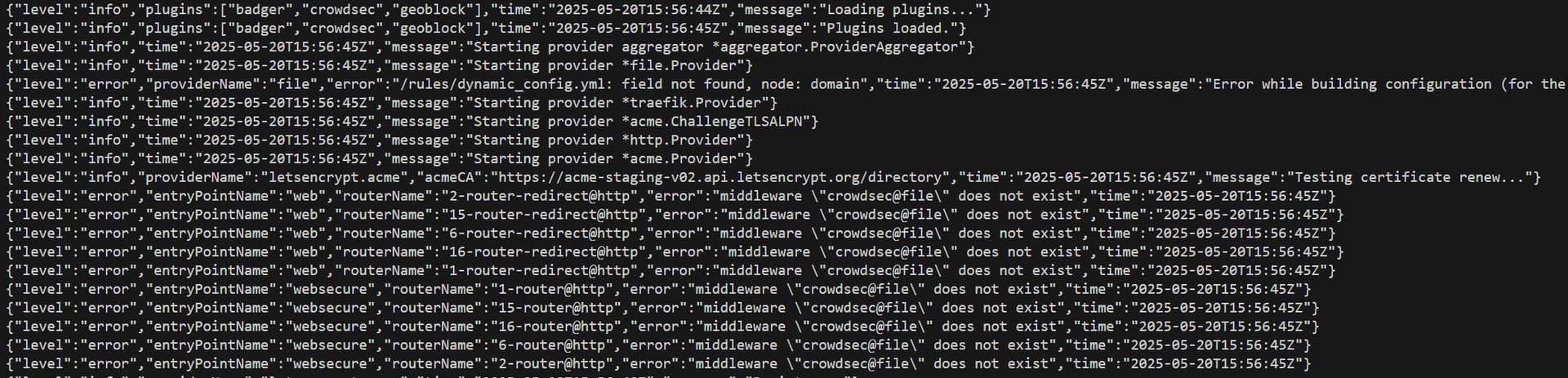
Here is part of my traefik_config.yml file
entryPoints:
  web:
    address: :80
    http:
      middlewares:
        - pangolin-geoblock@file
        - crowdsec@file
  websecure:
    address: :443
    http:
      middlewares:
        - pangolin-geoblock@file
        - crowdsec@file
      tls:
        certResolver: letsencrypt
    transport:
      respondingTimeouts:
        readTimeout: 30m

experimental:
  plugins:
    badger:
      moduleName: github.com/fosrl/badger
      version: v1.1.0
    crowdsec:
      moduleName: github.com/maxlerebourg/crowdsec-bouncer-traefik-plugin
      version: v1.4.2
    geoblock:
      moduleName: "github.com/PascalMinder/geoblock"
      version: "v0.3.3"
log:
  format: json
  level: INFO
providers:
  file:
    filename: /etc/traefik/dynamic_config.yml
    directory: "/rules"
    watch: true
  http:
    endpoint: http://pangolin:3001/api/v1/traefik-config
    pollInterval: 5s
serversTransport:
insecureSkipVerify: true```does resources show in your dashboard in api(dns validation) mode?
I have the same error, as soon as I add the directory: /rules in traefik_config it errors out
“level”:“error”,“entryPointName”:“websecure”,“routerName”:“42-router@http”,“error”:“middleware "crowdsec@file" does not exist”,“time”:“2025-05-30T21:09:40Z”} ││ {“level”:“error”,“entryPointName”:“websecure”,“routerName”:“35-router-auth-auth@file”,“error”:“middleware "crowdsec@file" does not exist”,“time”:“2025-05-30T21:09:40Z”} ││
`
Thank you very much for this. Until a fix will be found for my specific issue above, I copied the created middleware from the resource-overrides.yml for my services and added them into the dynamic_conf.
All working well, thanks.
All good now.
Issue was the middleware crowdsec@file was throwing errors since crowdsec docker was dead. Now all working good. Thank you.
LE:
One more question:
I’ve installed the geoblock plugin via the Plugin Hub (amazing), I can add it as middleware to all my resources but the main pangolin one.
What is the correct way to protect the pangolin.domain with geoblock as well with the Standard Security Headers?
And 2, is there a way to quickly add a middleware in the manager to cover all subdomains? I have 54 services and I’d like an easier way to to this.
I read in the comments when you spoke about SNI tcp, can we achieve this with it?
You can manually apply middlewares to http/s entry points that that would cover all traffic. Like this
entryPoints:
  websecure:
    address: ':443'
    http:
      middlewares:
        - auth@file
        - strip@file
Is it possible to use a TCP resource and apply middleware to that?
I’m trying to relay SMTP to an internal email server which works up until STARTTLS enabled mail servers send emails. I was hoping that Middleware Manager can help in that situation by bypassing TLS or some other option.
From Traefik Forums
-
STARTTLS is a protocol extension, not implicit TLS: Unlike implicit TLS (like SMTPS on port 465), where the connection is secure from the start, STARTTLS begins as a plain-text connection and then, through negotiation, upgrades to a TLS-encrypted one.
-
Traefik doesn’t yet support active STARTTLS negotiation for SMTP: Traefik, in its current implementation, cannot actively participate in the STARTTLS handshake and rewrite the SMTP protocol to proxy to a plain-text backend
I have a Pangolin resource protected with PIN but Middleware Manager shows it as “Unprotected”.
Is this expected behavior?
We don’t touch pangolin side at all. We only generate middleware override file. That’s all
Hi there. Thank you for sharing this amazing piece of work. I have a question for you, I’m trying to configure Authentik using your settings from above and while it does work I have an issue with the redirect url. Whenever I try to access my application I get redirected to the Authentik auth page, I put my credentials/MFA and instead of taking me back to my application it goes into Authentik dashboard, if I manually access my application after authentication it works but is not very friendly.
To give you deeper details, This is running on my home network using Portainer to have a stack with Pangolin, Gerbil, Traefik and Middleware-Manager. I have Authentik running in a separate stack but connected to the same docker network.
Pangolin is working as expected (configured as a reverse proxy), I’m able to access my applications using SSL, Pangolin’s password/pin authentication, etc.
Pangolin is configured to use a custom port, it uses the port 6443. So to access my aplication it would be “myapp.mydomain.tld:6443” and Authentik is also configured to run as a resource in Pangolin, and I can access it using “auth.mydomain.tld:6443” I configured the middleware to use: “auth.mydomain.tld:6443/outpost.goauthentik.io/auth/traefik” and inside my Authentik proxy provider, for the Authentication URL I used: “auth.mydomain.tld:6443”, same url for authentik_host inside the Authentik’s embedded outpost.
Am I missing anything?
Hey Guys,
Thanks for your effort, but hoping you might be able to help me tshoot.
Environment
- Traefik Version: v3.5.2
- MM Versions Tested: traefik-int → latest
- Setup: Standalone Traefik (no Pangolin) with ~100 file-based routes
- Docker Compose: Standard standalone configuration
 Issue Summary

  Middleware Manager has issues when used with standalone Traefik setups that use file-based service definitions for external hosts.

  Bug #1: Service Name Duplication (traefik-int tag)

  MM recursively appends @file suffixes to service names on each config regeneration:

  Progression:
  - Initial: service-name@file ✅
  - 1st run: service-name@file@file ❌
  - 2nd run: service-name@file@file@file@file ❌

  Traefik Logs:
  ERR error="the service \"changedetection-xxxxxx@file@file\" does not exist"
  ERR error="the service \"memos-xxxxx@file@file@file@file\" does not exist"
Bug #2: Provider Mismatch (latest tag) as a test
The duplication bug is fixed, but MM now incorrectly assumes all services are Docker containers instead of file-defined external services.
My Working Configuration (production-routes.yml):
  routers:
    xxx-xxxxx-auth:
      service: "xxx-xxxxx@file"    # Points to external service

  services:
    xxx-xxxx@file:               # External host definition
      loadBalancer:
        servers:
          - url: "http://192.168.2.21:81"  # External IP
  What MM Generates (resource-overrides.yml):
  routers:
    xxx-xxxxx-auth-auth:
      service: "xxx-xxxxx@docker"  # Wrong! No such container exists

  services:
    xxx-xxxxx@file:               # Correct service definition preserved
      loadBalancer:
        servers:
          - url: "http://192.168.2.21:81"
Result: Routers point to non-existent @docker services while the actual @file services exist.
Expected Behavior
For standalone setups, MM should preserve the original provider suffix (@file) when the services are defined in static files pointing to external hosts.
Reproduction Steps
- Setup standalone Traefik with file-based routes to external services
- Add MM with ACTIVE_DATA_SOURCE=traefik
- MM detects routes but generates @docker service references
- Traefik throws “service does not exist” errors
Configuration
middleware-manager:
image: hhftechnology/middleware-manager:latest
environment:
- ACTIVE_DATA_SOURCE=traefik
- TRAEFIK_API_URL=http://traefik:8080
- TRAEFIK_CONF_DIR=/conf
MM’s service detection logic appears to default to @docker provider for standalone setups, regardless of how the services are actually defined. For mixed environments (file-defined services + middleware management), MM should detect and preserve the
original provider type.
Thanks guys!
Have you tried starting fresh by deleting the middle manager DB file? And check what routers traefik knows about
docker exec pangolin curl http://localhost:3001/api/v1/traefik-config | jq
If you’re using authentik on a different host you need the proxy.
Sorry if this is to my post but im using plain traefik, no pangolin in the stack but i also have deleted db files multiple times.
@xXAzazelXx hi. Seems you have tested this well. Most people use MM with Pangolin so good to get this feedback. Can you open a GitHub issue here and the devs will take a look at this
Hi there!
First of all, thanks a lot for taking the time to answer my question and for providing the MM software.
I am talking about the following: A Pangolin resource is protected with a PIN (not with SSO-Users & Roles)
At the same time MM shows the same Pangolin resource as unprotected.
The only way to have this shown as “Protected” is to change the resource in Pangolin and enable the “Users & Roles”. Even enabling the “Password Protection” still shows it as “Unprotected”.
I understand that MM doesn’t change Pangolin but is this an expected behavior? Is this something that Pangolin provides and you just show it or maybe MM is looking for “Protected” resources only for the “Users & Roles”?
Hi @irdet2 this can be a little bit confusing. If you see not protected in MM it means that you haven’t applied a middleware using MM. It doesn’t mean not protected in Pangolin. The protected status in Pangolin does not show in MM
Hello @Mattercoder
I am not 100% sure that I follow your explanation because when Pangolin has enabled the “Users & Roles” it is shown as protected in the MM, hence the confusion.