Ripping my hair out after trying to update to use latest install script and Middleware Manager v3.0.1 (and the plugs in for GeoblockIP / Crowdsec Manager… not even sure the plug works or your supposed to still add that using the ./installer.sh) ?
It’s will not work if you have deployed middleware manager. Paths have changed. You will have to manually edit the script before running it with the altered paths
Hello and thank you in advance for your great work!
I have installed pangolin with crowdsec using the official installer.
I used your lovely script to test the configuration, enroll in cloud console etc.
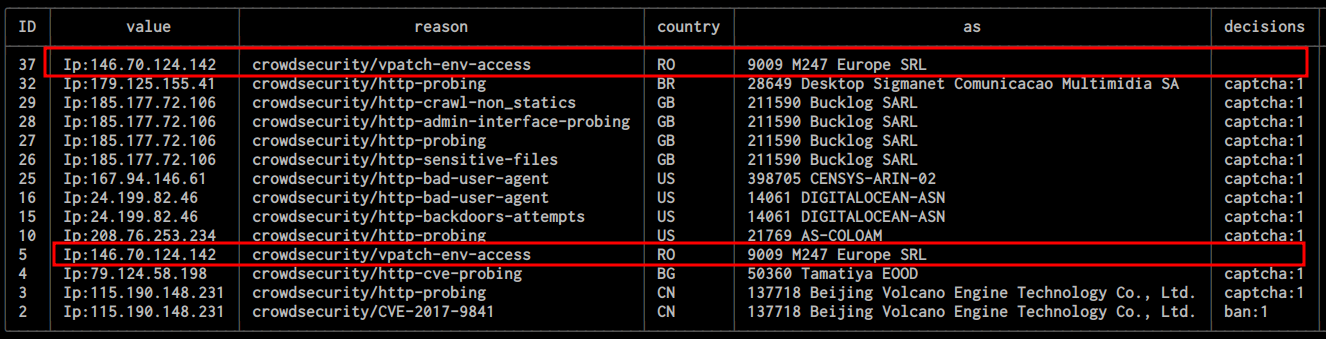
I also installed collections using the script but when i check my alerts I can see that it does not apply a decision for vpatch-env-access, as per the screenshot.
I am not sure where to start looking for misconfiguration or other info, but in traefik dynamic yaml file i can see Appsec being enabled so not sure where to look any further. The script does confirm the middleware being installed correctly so i assumed that includes Appsec. Many thanks!!
root@reverseproxy:~/docker/pangolin# docker exec -it crowdsec cscli notification test discord
INFO Crowdsec CTI helper enabled                                                                                                                                                                                                                                    0.1s
DEBUG starting plugin                               args="[/usr/local/lib/crowdsec/plugins/notification-http]" module=plugin path=/usr/local/lib/crowdsec/plugins/notification-http                                                                                 0.2s
DEBUG plugin started                                module=plugin path=/usr/local/lib/crowdsec/plugins/notification-http pid=662                                                                                                                                    0.2s
DEBUG waiting for RPC address                       module=plugin plugin=/usr/local/lib/crowdsec/plugins/notification-http                                                                                                                                          6.3s
DEBUG using plugin                                  module=plugin version=1                                                                                                                                                                                        12.1s
TRACE waiting for stdio data                        module=plugin                                                                                                                                                                                                  12.1s
INFO registered plugin discord                                                                                                                                                                                                                                      0.1s
INFO registered plugin http_default                                                                                                                                                                                                                                 0.1s
INFO pluginTomb dying                                                                                                                                                                                                                                               0.1s
INFO cti call for 10.10.10.10                      module=cti type=crowdsec-cti
DEBUG request for 10.10.10.10 took 472.574164ms     module=cti type=crowdsec-cti
INFO received signal for discord config            @module=http-plugin module=plugin
WARNING HTTP server returned non 200 status code: 400  @module=http-plugin module=plugin
INFO killing all plugins
DEBUG received EOF, stopping recv loop              err="rpc error: code = Unavailable desc = error reading from server: EOF" module=plugin
INFO plugin process exited                         id=662 module=plugin plugin=/usr/local/lib/crowdsec/plugins/notification-http
DEBUG plugin exited                                 module=plugin
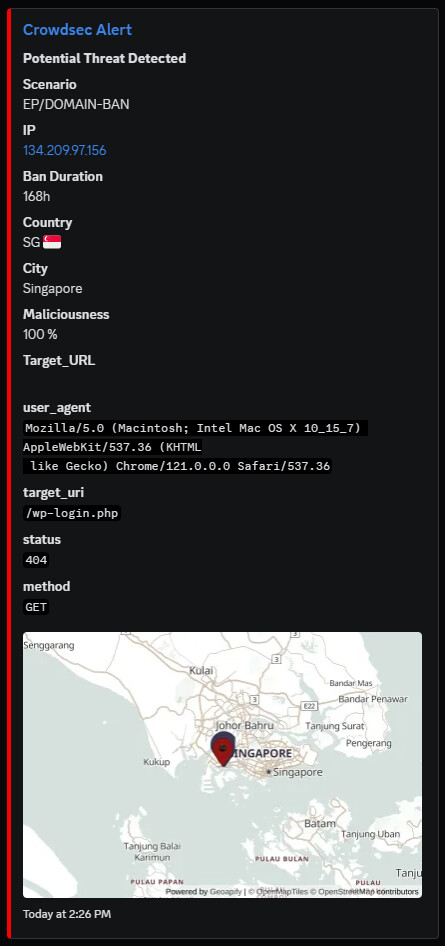
crowdsec manager with pangolinsomething error on notification plugin.
hi all
can’t get the new http version to run on a ubuntu testserver. Followed the github instructions to the teeth, containers are running, the curl command gives me no result however. Can’t access the interface from another machine either and I tried changing the ports as well…
Firewall is also disabled just in case.
Great App, Finally got it Semi to work (a couple of issues, I have Crowdsec console enabled, but the app thinks its not. Also the captcha section is saying it’s not configured, but i did a test and it does show up..
whenever I Try to set up captcha through crowdsec manager, the Apply shows:
Create captcha HTML page
traefik configuration directory not found: stat config/traefik: no such file or directory
and:
Update Traefik dynamic config
failed to read dynamic_config.yml from local path: open config/traefik/dynamic_config.yml: no such file or directory
I didn´t change any folders either in my traefik compose or in the Crowdsec manager compose. I also didn´t change the folger in the settings of crowdsec manager.
Config validation shows, that the dynamic config an static config match.
This looks fantastic and I’m keen to try it. However I’m a bit confused as to which variant I need to install if I’ve already got Pangolin, Traefik, and CrowdSec up and running.
Is the full stack deployment option effectively replacing the standard Pangolin and CrowdSec installer?
Or would you run this alongside your main stack?
Sorry for the basic question but I want to make sure I’ve understood this right before I start breaking things.
I am also confused. I decided to start over if I follow the setup guide for the Pangolin variant. The result is that only Traefik and the crowdsec Manager run and all other containers constantly restart. There was also no option to setup the domain for Pangolin or do the initial setup step. There is also no config dir set for pangolin in the compose file created. Is that also correct?
I use a vps from ionos that I reset to a new Debian 13 image before starting. The only extra thing I did was install git and docker.
Yup, I’m having trouble as well. I stopped all my existing containers (pangolin, traefik, gerbil) and cloned the crowdsec_manager repo and started the containers from there. I can no longer access pangolin but the crowdsec portal works. Am I supposed to append my original compose.yml with the crowdsec stuff or use this entirely new directory that was created?