This is kind of strange and I haven’t dug super deep into it but here goes.
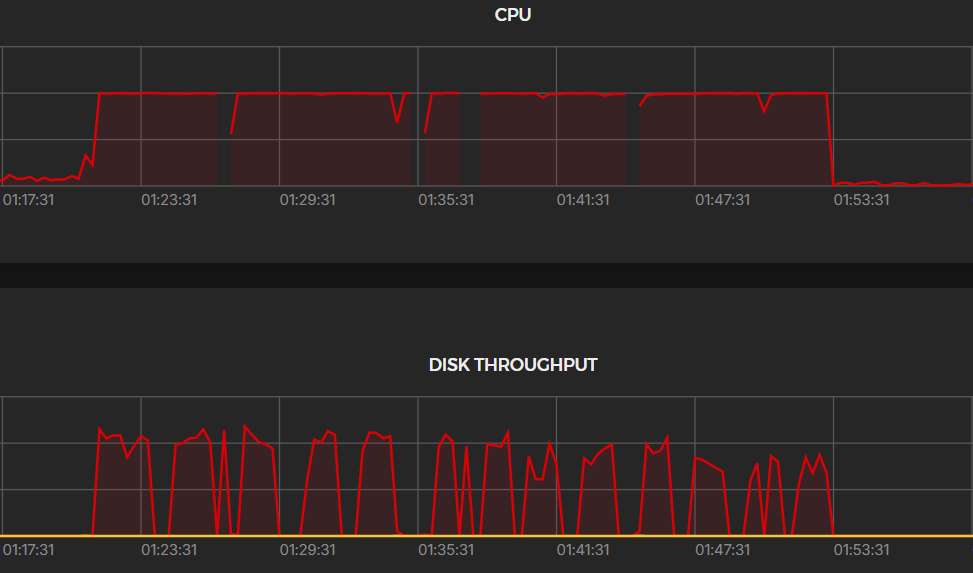
It seems like the new (1.0.4) backend eats about 5GB of ram a second until it crashes, only to restart and do the same again over and over again. My log file is about 1MB. I have ~20GB free on the system and it takes about 4-5 seconds from container start to container exit (137). I’m not entirely sure what could be causing this, here is my compose file:
Yea this completely crashed my VPS multiple times, I haven’t had a chance to try and debug but this is pretty bad I just removed the containers for now.
Yes. Same. My VPS became very unhappy until docker compose down finally did something.
The missing parts in the graph is forced reboots when it stopped responding at all.
Updated to 1.0.5 and it also does the same memory issue. Might be best to watch for any updates in the change log for this issue so we know it’s safe to update.
@hhftechnology Thank you. It would be possible to have a more understandable README in QuickStart when integrating MaxMind because now it is divided into multiple parts that do different things. I wouldn’t want the problem to arise from a wrong configuration we set up because I personally started from:
docker compose down
docker compose build --no-cache
docker compose up -d
going to supplement MaxMind’s variables.
This is considering that on your configuration you had no problems.
@hhftechnology Thank you. It would be possible to have a more understandable README in QuickStart when integrating MaxMind because now it is divided into multiple parts that do different things. I wouldn’t want the problem to arise from a wrong configuration we set up because I personally started from:
docker compose down
docker compose build --no-cache
docker compose up -d
going to supplement MaxMind’s variables. This is considering that on your configuration you had no problems.
yes i would. but for future always cap your resources when you deploy a log viewer/analytic container.
# Path to your Traefik log file or directory
# Can be a single path or comma-separated list of paths
# Examples:
# - Single file: /path/to/traefik.log
# - Single directory: /path/to/logs/
# - Multiple paths: /path/to/logs1/,/path/to/logs2/,/path/to/specific.log
TRAEFIK_LOG_PATH=/Volume1/pangolin/config/traefik/logs

# Backend API port (optional, default: 3001)
PORT=3001

# Frontend port (optional, default: 3000)
FRONTEND_PORT=3000

# Backend service name for Docker networking (optional, default: backend)
BACKEND_SERVICE_NAME=backend

# Container names (optional, with defaults)
BACKEND_CONTAINER_NAME=traefik-dashboard-backend
FRONTEND_CONTAINER_NAME=traefik-dashboard-frontend
Logs:
Details
traefik-dashboard-backend   | [GIN-debug] [WARNING] Creating an Engine instance with the Logger and Recovery middleware already attached.
traefik-dashboard-backend   |
traefik-dashboard-backend   | [GIN-debug] [WARNING] Running in "debug" mode. Switch to …
GitHub discussion traefik-log-dashboard #30 in Help, started by