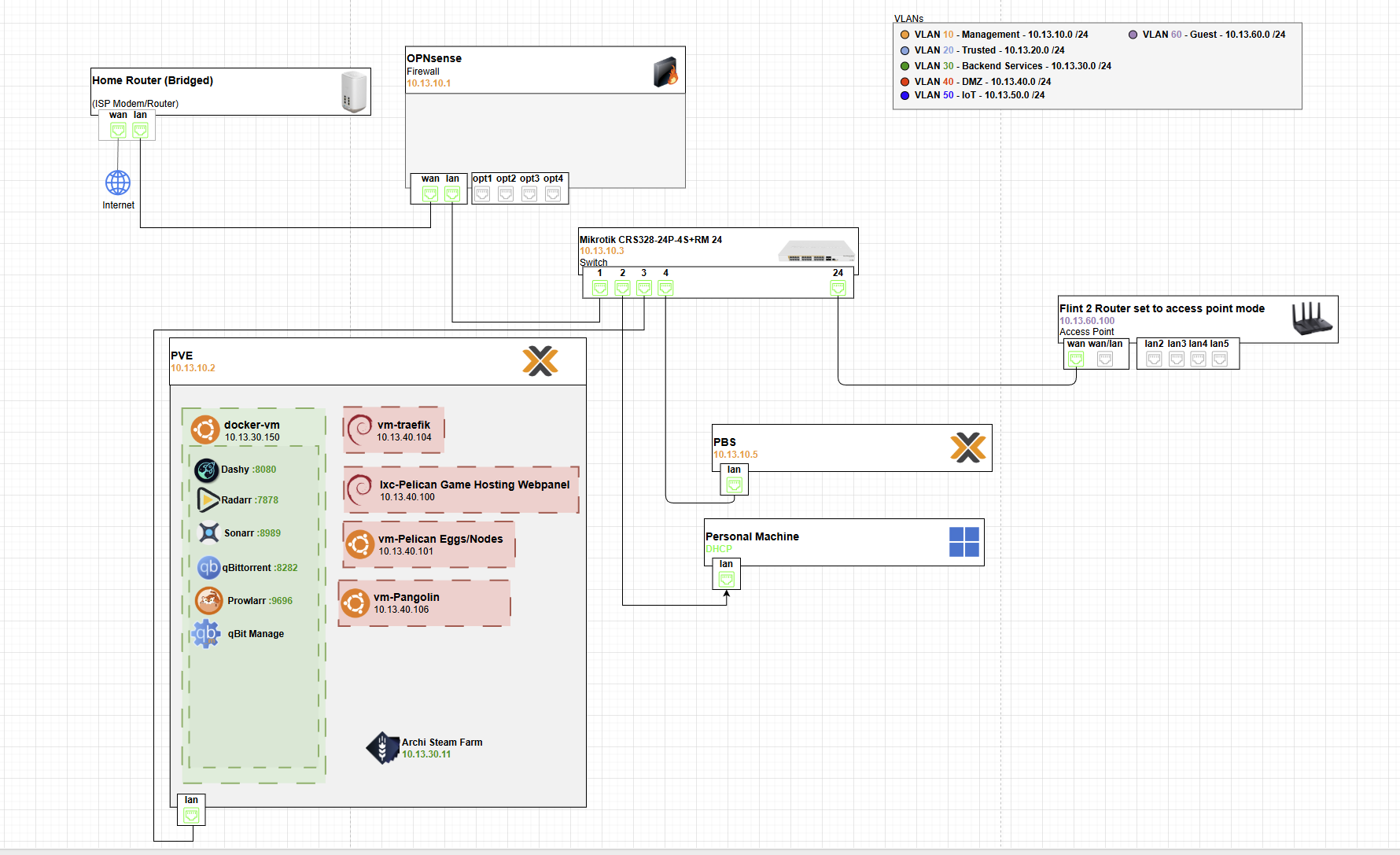
- Whats ive been finding a nightmare is where stuff should be on the network and why. Ive had some people say everything public goes on vlan 40 aka DMZ, along with the reverse proxy. Ive had others say reverse proxy goes DMZ and then the services go on like vlan 30 aka Backend Services vlan and then have holepunch rules allowing reverse proxy from dmz into backend vlan. The way I currently have stuff setup is a nfs server on the proxmox host os so that I can share access to the hard drives to all the vms that need it instead of just 1. But where I get lost is what VLAN’s stuff like qbit, Arr* stack, jellfin, jellyseer, etc should be. This is just as an example but you get the idea, same with game server hosting panel. Just not sure what should go where. I want them to be accessible to my friends without having to vpn in which pangolin helps with that but theres some things I dont want to have to have SSO enabled but still be secure. Sorry if that doesnt make a whole lot of sense im kind of all of the place rn but yeah.
Network Segmentation Best Practices for Your Setup
Your diagram shows VLANs already defined: Management (10), Trusted (20), Backend (30), DMZ (40), and Guest (60). That’s a great start for a homelab with public exposure. The key is balancing accessibility (e.g., for friends via Pangolin/Tailscale-like mesh VPN) with security: minimize east-west traffic (VM-to-VM), use firewall rules for north-south (in/out), and least-privilege access.
I’ll break this down step-by-step:
- Core Principles for placement.
- Specific Recommendations for your services (qBittorrent, Arr* stack, Jellyfin, Jellyseerr, game servers, NFS, etc.).
- Firewall Rules & Routing to make it secure without SSO everywhere.
- Why This Over Other Advice (addressing the DMZ vs. Backend debate).
This assumes your MikroTik (CRS328) is handling VLAN routing/firewalling (via RouterOS), Proxmox is on VLAN 10/20, and Pangolin is your zero-config VPN for friend access (exposing services without full VPN tunnels).
1. Core Principles
- VLAN 10 (Management): “Crown jewels”—only admin tools. No user/services here. Access via SSH/RDP only from Trusted (20) or your personal machine.
- VLAN 20 (Trusted): Your daily devices (personal machine, phone). Low-risk, full internal access.
- VLAN 30 (Backend): Internal services that talk to each other (e.g., Arr* to qBittorrent). Isolated from public but accessible from Trusted via rules.
- VLAN 40 (DMZ): Public-facing edge (reverse proxy, any direct exposures). No trust—sandbox it. Internet → DMZ only; DMZ can’t initiate to Backend/Trusted.
- VLAN 60 (Guest): WiFi for visitors/friends. No internal access; internet-only or Pangolin-routed.
- General Rules:
- Use your reverse proxy (Traefik in the diagram) as the single public entry point.
- Firewall everything: MikroTik’s /ip firewall filter/nat for inter-VLAN blocks, allow only specific ports/IPs.
- NFS on Proxmox host: Bind it to Backend (30) only; use Proxmox’s VLAN bridging to restrict.
- Friend access: Pangolin tags peers as “trusted” (like Tailscale ACLs), routing them to Backend services without exposing DMZ.
This setup lets friends hit services (e.g., Jellyfin) via Pangolin → Reverse Proxy → Backend, without VPN overhead or SSO on everything.
2. Specific Service Placements
Based on risk (public exposure, data sensitivity) and dependencies (e.g., Arr* needs qBittorrent). Here’s a table for clarity:
| Service | Recommended VLAN | Why? | Exposure/Access Notes |
|---|---|---|---|
| Reverse Proxy (Traefik) | 40 (DMZ) | Public entry point—handles HTTPS/TLS termination. Exposes only to internet (ports 80/443). | Internet → Traefik (allow 80/443). Friends via Pangolin to Traefik’s internal IP. No direct access to other services. |
| qBittorrent | 30 (Backend) | Downloads torrents (potentially risky IPs), but you control seeding. Internal only unless you want public seeding (then DMZ). | Accessible from Arr* (same VLAN) and Trusted (20) via rules. Bind NFS shares here for media storage. No public port forward—use Traefik if web UI needs external access. |
| Arr Stack (Sonarr, Radarr, etc.)* | 30 (Backend) | Internal automation—talks to qBittorrent/Plex/Jellyfin. Low public risk. | Full access within 30; from 20 (Trusted) for your manual tweaks. Pangolin friends → Traefik → Arr* (if you expose UI, but better not—use Overseerr/Jellyseerr instead). |
| Jellyfin | 30 (Backend) | Media server—your library, friend streaming. Sensitive (personal media). | Traefik proxies streams (e.g., /jellyfin). Allow from DMZ (Traefik) only on port 8096. Friends via Pangolin to Traefik endpoint. NFS mount media dirs from Proxmox. |
| Jellyseerr | 30 (Backend) | Request UI for Arr*/Jellyfin—internal tool, but user-facing for friends. | Proxy via Traefik if exposed (/jellyseerr). Allow from DMZ only. No SSO needed if Traefik handles auth (e.g., Authelia middleware). |
| Game Server Hosting Panel (e.g., Pterodactyl) | 30 (Backend) for panel; 40 (DMZ) for game servers if public | Panel is admin/internal; game servers need public UDP ports (e.g., 25565 for Minecraft). Split if possible. | Panel: Internal access only. Game servers: DMZ for direct ports, or proxy UDP via Traefik (tricky—use raw forwards). Friends connect via Pangolin-routed IPs. |
| NFS Server (on Proxmox host OS) | Bridge to 30 (Backend) only | Shares storage to VMs—don’t expose broadly. Proxmox host should be on 10/20, but NFS iface on 30. | Restrict exports to Backend IPs (e.g., /etc/exports: /mnt/media 10.13.30.0/24(rw,sync)). No access from DMZ/Guest. |
| Plex (from diagram) | 30 (Backend) | Similar to Jellyfin—media, friend access. | Proxy via Traefik. Allow DMZ → 32400 only. |
| Docker VM / Other Containers | 30 (Backend) | Hosts multiple services—keep consolidated. | As above per container. |
| Personal Machine / DHCP | 20 (Trusted) | Your daily driver—full access to 30 for convenience. | DHCP scopes per VLAN on MikroTik. |
- Proxmox Host: Keep on VLAN 10 (Management) for console access. Bridge VM nics to appropriate VLANs (e.g., via OVS or Linux bridges in Proxmox).
- Unused/Edge Cases: IoT? VLAN 50 if you add one. Anything super-sensitive (e.g., banking VM)? VLAN 20 only.
3. Firewall Rules & Routing (MikroTik Focus)
Your MikroTik is the gatekeeper—use /ip firewall to enforce this. Quick setup sketch (via Winbox or CLI):
- NAT/Masquerade: WAN → DMZ only (e.g., chain=srcnat, out-interface=WAN, action=masquerade for DMZ src).
- Input Chain (to Router): Drop all except Management (10) from anywhere but 20.
- Forward Chain (Inter-VLAN):
- Allow: 20 (Trusted) → 30 (Backend) on specific ports (e.g., 8096 Jellyfin, 6881 qBittorrent web).
- Allow: 40 (DMZ/Traefik) → 30 (Backend) only for proxied ports (e.g., src=Traefik IP, dst=service IP:8096, protocol=tcp).
- Drop: Everything else (DMZ → 20/10, 30 → 40, Guest → anywhere internal).
- Pangolin: Treat as “Trusted” extension—add ACLs to allow its IPs/ports (e.g., UDP 41641) from WAN → Backend via Traefik.
- Port Forwards: WAN → Traefik (80/443) only. No direct forwards to Backend.
- Testing: Use
tcpdumpon Proxmox or MikroTik’s torch tool to verify no leaks.
For no-SSO security: Traefik middleware (e.g., forward-auth to Authelia in Backend) adds login without per-service config. Or Cloudflare Tunnel if you want zero-ports-exposed (pairs well with Pangolin).
4. Why This (Not “Everything in DMZ”)?
- DMZ-All Advice: Simple but risky—breach in one service (e.g., vuln in game panel) spreads to everything. Your VLANs allow granular control.
- Proxy-in-DMZ + Backend Services: Best of both—public hits proxy (isolated), then punched-through to internal (firewall-limited). Matches zero-trust: assume breaches.
- Tradeoffs: More rules = more setup time, but tools like MikroTik’s firewall templates or Ansible make it scriptable. Start simple: Move Traefik to 40, services to 30, add 2-3 rules, test with
nmapfrom each VLAN.