You can achieve this but it will be a code rewrite.
Hello! I have managed to get this up and running on unraid! awesome work btw! thank you for the amazing setup!! I ran into an issue where I wanted to gain a wild cert. I have changed the config in pangolin prefer_wildcard_cert from false to true but now the pangolin cloudflare tunnel docker logs says Error polling Traefik routers: json: cannot unmarshal object into Go struct field .tls.domains of type string" I tried reverting it back I still get the message! I was happy that it was working but noticed that the acme.json is empty and traefik logs shows that its not pulling certs so I figured that would be the case
Managed to fix it!! just copied the dynamic_config. It seems there was a typo or something. Now its working!!! and its pulling the certs!!!
Very interested to learn how you got it setup and working on Unraid. I tried several times, but I was not successful.
you will require compose plugin.
Sure! Ill post my installation within a few minutes. But definitely would be soooooooooo easy to get it running with compose plugin ( just install code-server with portainer ). As soon as i reach my pc ill be happy to post every container. Got to admit though… very challenging to do it without a compose file lol.
as for my config file for pangolin here.
app:
  dashboard_url: "https://pangolin.domain.com"
  log_level: "info"
  save_logs: false

domains:
  domain1:
    base_domain: "domain.com"
    cert_resolver: "letsencrypt"
    prefer_wildcard_cert: false

server:
  external_port: 3000
  internal_port: 3001
  next_port: 3002
  internal_hostname: "pangolin"
  session_cookie_name: "p_session_token"
  resource_access_token_param: "p_token"
  resource_access_token_headers:
    id: "P-Access-Token-Id"
    token: "P-Access-Token"
  resource_session_request_param: "p_session_request"

traefik:
  cert_resolver: "letsencrypt"
  http_entrypoint: "web"
  https_entrypoint: "websecure"

gerbil:
  start_port: 51820
  base_endpoint: "domain.com"
  use_subdomain: true
  block_size: 24
  site_block_size: 30
  subnet_group: 100.89.137.0/20

rate_limits:
  global:
    window_minutes: 1
    max_requests: 100

email:
  smtp_host: "smtp.gmail.com"
  smtp_port: 587
  smtp_user: "no-reply@example.com"
  smtp_pass: "aaaaaaaaaaaaaaaaaa"
  no_reply: "no-reply@domain.com"

users:
  server_admin:
    email: "email@gmail.com"
    password: "password"

flags:
  require_email_verification: true
  disable_signup_without_invite: true
  disable_user_create_org: true
  allow_raw_resources: true
  allow_base_domain_resources: true
Thats it! just make sure you have the other yml copied exactly the same! seriously one spelling mistake and pangolin-cloudflare-tunnel container will remove your pangolin.domain.com lol
Almost forgot! The reason I have /rules in my traefik container its because I did middleware-manager so make sure in the traefik_config.yml to use
  file:
    directory: "/rules"
    watch: true
instead of
  file:
    filename: "/etc/traefik/dynamic_config.yml"
and just place the dynamic_config.yml in the /rules directory. Trust me you will need it later lol
Ok, for cloudflare tunnels I only got this in the extra parameters: tunnel --no-autoupdate run --token={YOUR CLOUDFLARE TUNNEL TOKEN}
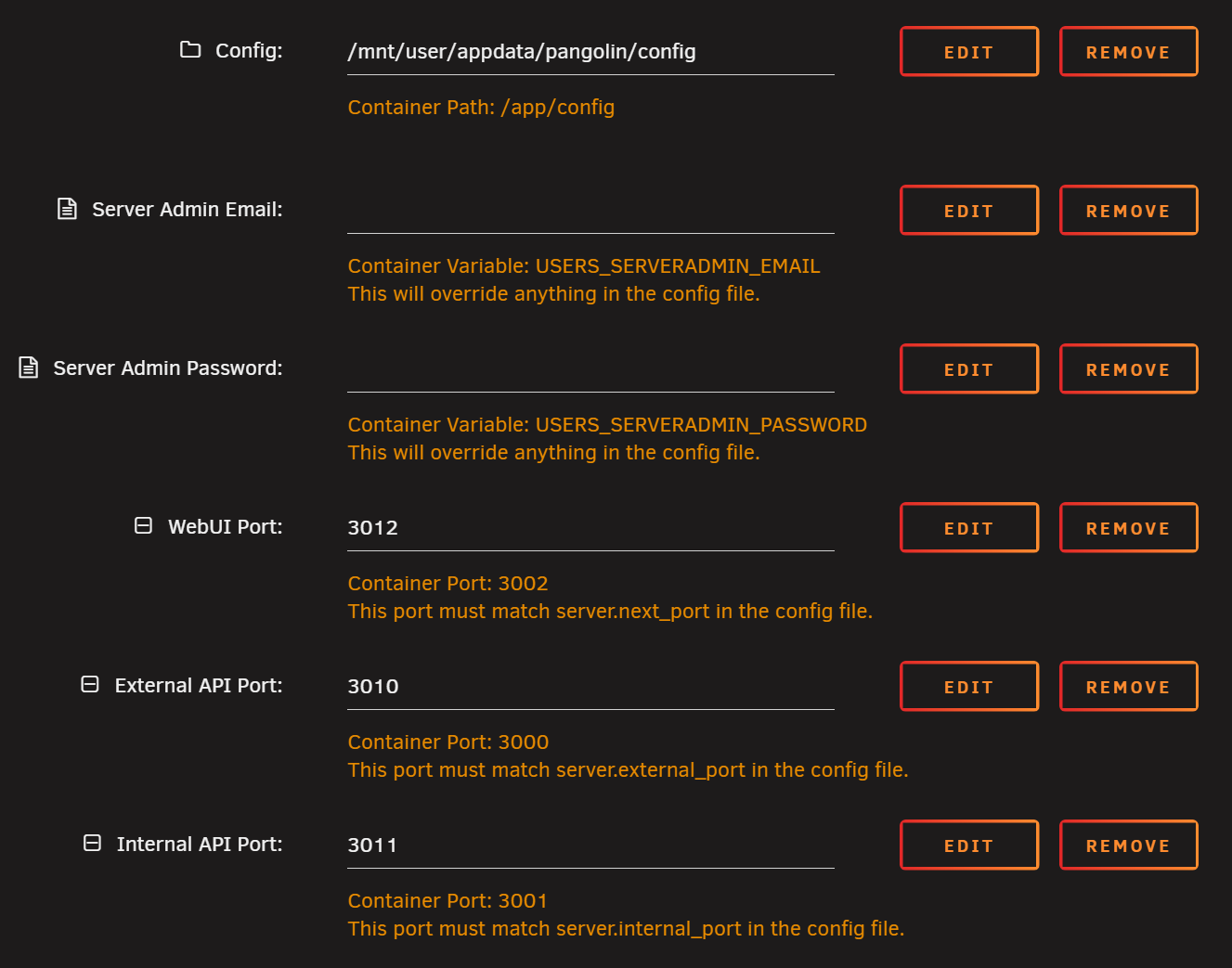
Pangolin container:
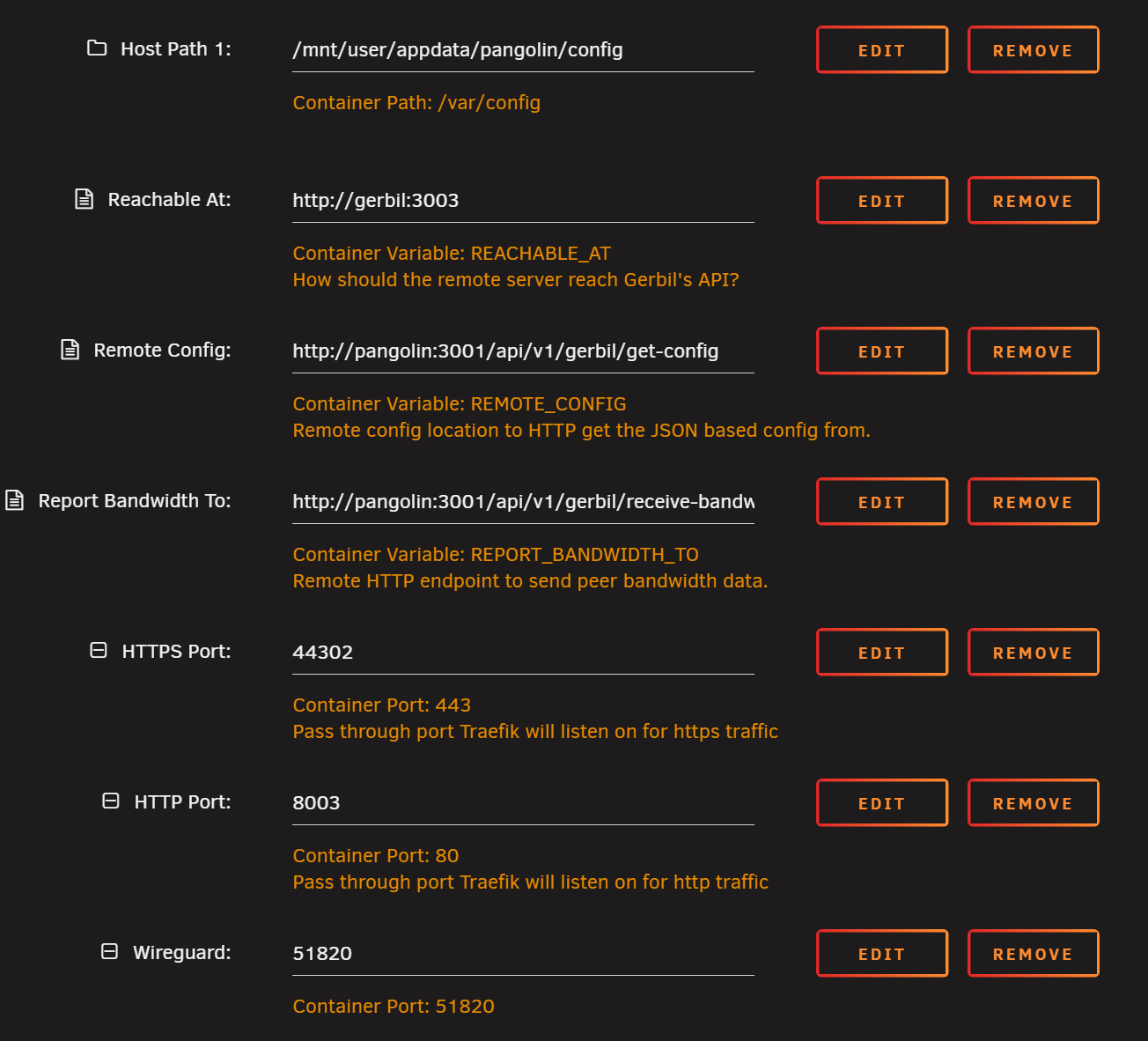
Gerbil container: just going to need it for initial setup
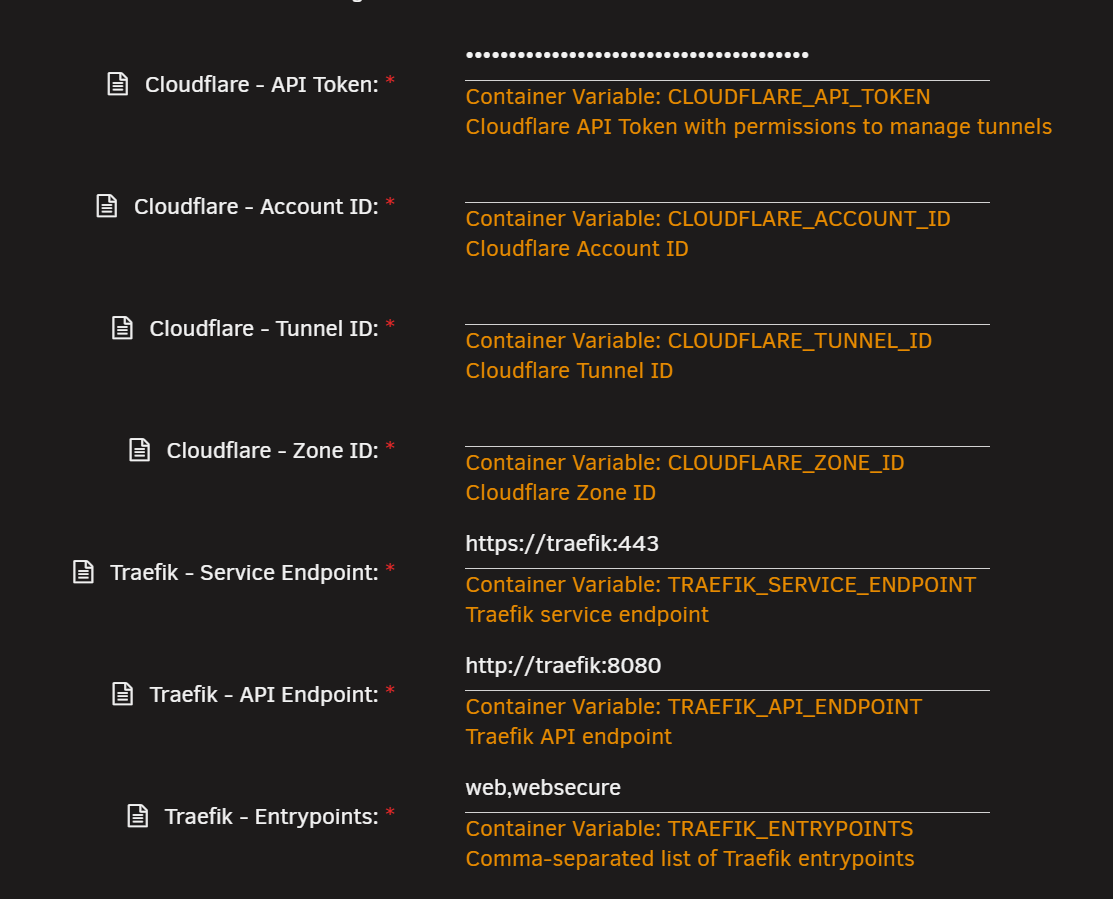
Pangolin-Cloudflare-Tunnel container:
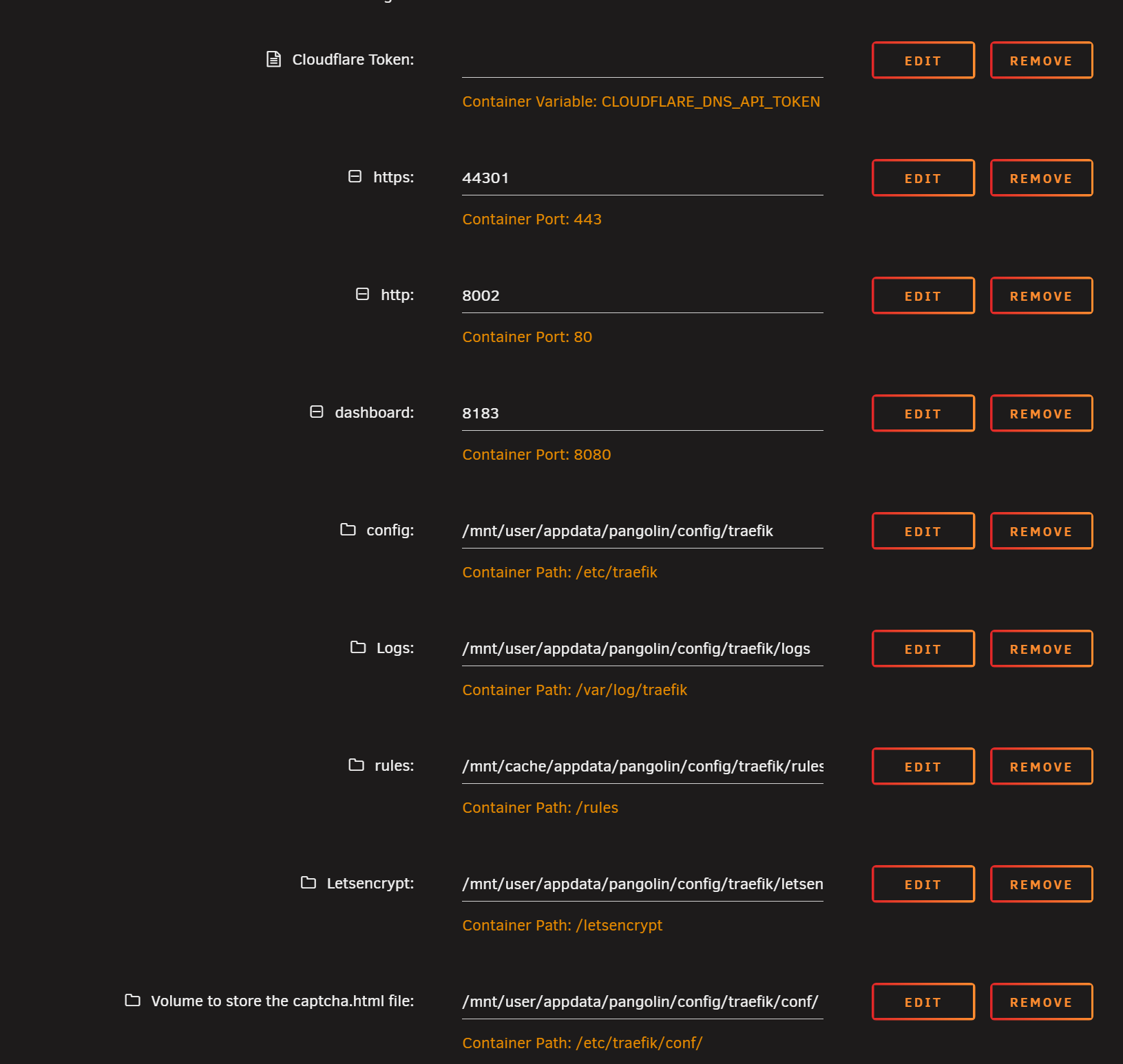
Traefik container: in the post arguments type this --configFile=/etc/traefik/traefik_config.yml
next post will be the yml
Thank you for the guide. However when I tried to do docker compose up -d, I get this error
service “cloudflared” refers to undefined network pangolin: invalid compose project
How do I overcome this?
Either remove this line or set it to what your network is called.
networks: - pangolin_network # Or whatever your network is named
You do not need to specify the network in each service if you’re using the default network like this:
networks: default: driver: bridge name: pangolin
Which is the default config from the pangolin installer
Thank you Sir! That worked a treat
Hi folks,
I am getting an error since changing my certificates to Wildcard.
[pangolin-cloudflare-tunnel]
time="2025-12-30T13:59:59Z" level=info msg="Loaded single zone configuration (legacy mode)"
[pangolin-cloudflare-tunnel]
time="2025-12-30T13:59:59Z" level=info msg="Configuration loaded" enable_cleanup=true entrypoints="[web websecure]" ignore_patterns=0 poll_interval=10s skip_tls=false zones=1
[pangolin-cloudflare-tunnel]
time="2025-12-30T13:59:59Z" level=info msg="Starting synchronization service"
[pangolin-cloudflare-tunnel]
time="2025-12-30T14:00:09Z" level=error msg="Failed to poll Traefik routers" error="json: cannot unmarshal object into Go struct field .tls.domains of type string"
[pangolin-cloudflare-tunnel]
time="2025-12-30T14:00:09Z" level=error msg="Error polling Traefik routers: json: cannot unmarshal object into Go struct field .tls.domains of type string"
[pangolin-cloudflare-tunnel]
time="2025-12-30T14:00:19Z" level=error msg="Failed to poll Traefik routers" error="json: cannot unmarshal object into Go struct field .tls.domains of type string"
[pangolin-cloudflare-tunnel]
time="2025-12-30T14:00:19Z" level=error msg="Error polling Traefik routers: json: cannot unmarshal object into Go struct field .tls.domains of type string"
Below is a snippet from my Traefik dynamic_config.yml
    # Next.js router (handles everything except API and WebSocket paths)
    next-router:
      rule: "Host(`pangolin2.domain.com`) && !PathPrefix(`/api/v1`)"
      service: next-service
      entryPoints:
        - websecure
      middlewares:
        - badger
      tls:
        certResolver: letsencrypt
        domains:
          - main: "domain.com"
            sans:
              - "*.domain.com"
When i remove the following section or comment out;
        domains:
          - main: "domain.com"
            sans:
              - "*.domain.com"
Then the Cloudflare tunnel works again.
I’m not entirely sure what is the best way to get around this (should i just remove the above section?), as i followed the Wildcard Domains - Pangolin Docs when setting up the Wildcard domains.
Thanks
i have replied in help @DarkToad
For Unraid, the CA docker container “unraid cloudflared tunnel” might be preferred instead of “cloudflared”. It also has extra environment variables/options.
I thought it was confusing that both the “Pangolin-Cloudflare-Tunnel” AND the “cloudflared” containers are needed. I was thinking everything required for Cloudflare integration could happen with just the “Pangolin-Cloudflare-Tunnel” container.